
The best entertainment platform is rarely the one shouting loudest about its feature list. It is the one you stop thinking about while using it, because streams start quickly, games load without a hitch, search understands what you meant rather than what you typed, and nothing collapses at the moment that matters. If you want a quick sense of how modern hubs bundle live sessions with on-demand content in a single tidy space, have a look at how platforms like this website pull it all together. It gives you a useful reference point for what low friction actually feels like in practice.
What follows is a straightforward way to evaluate your options without being dazzled by a slick demo reel. No magic tricks, just the rather boring questions that decide whether you will still be happily using a service six months from now.
Start With Your Calendar, Not Their Claims
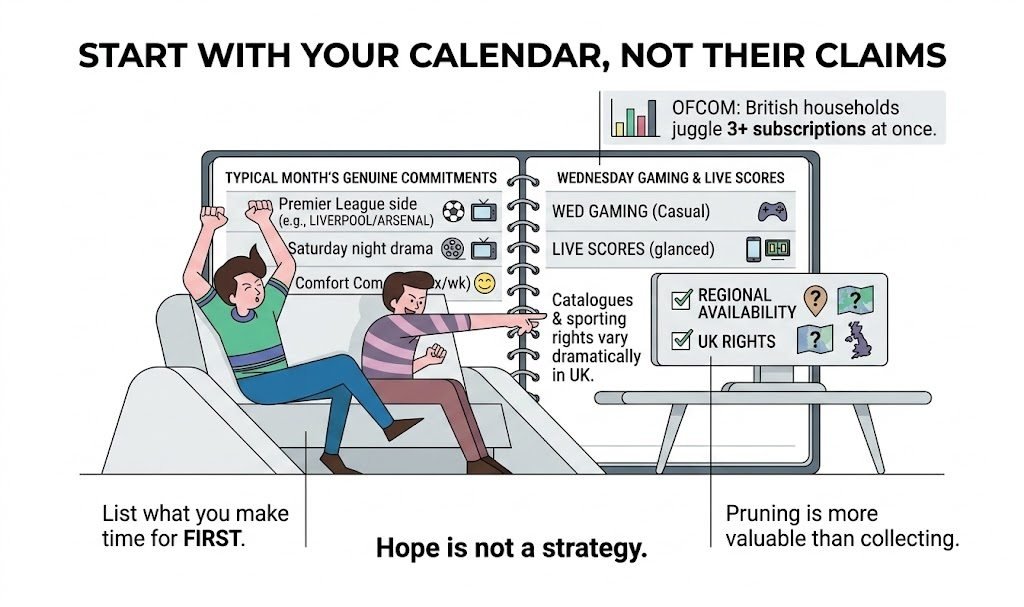
Most people do not actually want access to everything. They want access to their things. Before signing up for anything, spend ten minutes listing what you genuinely make time for across a typical month. That might be a Premier League side, a Saturday night drama, a couple of comfort comedies, a bit of casual gaming on a Wednesday evening, or live scores glanced at between meetings.
Once you have that list, check regional availability. Catalogues and sporting rights in the UK vary dramatically between platforms, and “coming soon” often means “not this season, possibly next.” According to Ofcom’s Media Nations report, British households increasingly juggle three or more subscription services at once, which makes thoughtful pruning more valuable than collecting apps for the sake of it.
If your staples are not there on day one, hope is not a strategy.
Reliability Over Hype
A beautiful homepage will not rescue a stuttering feed during the closing minutes of a cup final. During any trial period, stress test the basics properly:
- Time to first frame on a live stream or first playable moment in a game
- Stability at peak hours, especially during derbies, premieres, and finale nights
- Recovery behaviour after a brief network dip, such as walking to a different room
- Whether instant rewind or DVR really is instant, or quietly lags by several seconds
- Search that forgives typos, accepts synonyms, and handles British spellings
- Sync of “continue watching” across your devices
Most viewers will forgive slightly softer pixels. Very few will forgive a frozen screen at the decisive penalty.
UX That Gets Out of the Way
A well-designed site feels like it has read your mind. You should not need a tutorial to find captions, change audio tracks, or return to where you left off. Look out for:
- Clean navigation with no maze of nested menus
- Native playback controls are placed where muscle memory expects them
- An honest “continue watching” row that sits at the top, not buried three rows down
- Watchlists and reminders that behave consistently across devices
- Recaps and highlights that genuinely respect your time
If the service requires a help article to explain where the subtitles live, it has already lost you.
Speed Versus Quality: Know Your Priority
This is where people often choose wrong. For live sport and events, a faster and smoother stream at 50 or 60 frames per second generally beats a pristine but delayed 4K feed, because you want to see the goal before your neighbour cheers three seconds ahead of you. On mobile, 720p at 60fps with near instant start-up usually feels far better than full HD, which buffers whenever you move.
For prestige cinema, nature documentaries, or any set-piece visual experience, chase resolution and HDR instead, but only if your home broadband can actually hold it. Ofcom’s broadband performance research consistently finds that average UK speeds support 4K in most urban areas comfortably, though rural connections and peak-time dips remain real considerations worth planning around.
Matching Priorities to Content
| Content Type | What to Prioritise | Sensible Settings |
|---|---|---|
| Live football or rugby | Low latency and smooth motion | 1080p at 60fps, wired where possible |
| Drama and cinema | Resolution, HDR, surround sound | 4K HDR on a wired TV, calm network |
| Mobile viewing on the go | Fast start-up, low data use | 720p at 60fps, cellular-friendly mode |
| Casual gaming sessions | Input lag and reliability | Wired Ethernet, closest regional server |
| Background viewing | Audio clarity, simple UI | 720p, captions on, minimal alerts |
| Shared big-screen evenings | Stability and picture-in-picture | Highest stable feed, multi-view if offered |
Use this as a starting point rather than gospel. Your own kit and connection will nudge the ideal settings in one direction or another.
Personalisation With a Brake Pedal
Recommendations are helpful until they quietly take over the house. The better platforms let you:
- Reset or gently retrain the algorithm with “not interested” rather than “dislike.”
- Create separate profiles for household members and properly protected kids’ spaces
- Control alerts by type, by competition, and by frequency
- Pick language and commentary tracks that actually sound native to a UK ear
Personalisation should feel helpful, never clingy. If a platform pesters you with notifications you cannot tame, that is a design choice rather than a limitation.
Context That Explains, Not Shouts
For longer formats such as matches or drama series with layered plots, context really matters. The best platforms layer it in lightly with chapter markers, key moments you can jump to, and data overlays you can toggle when you want them. Chuck three charts on screen every minute, and you have an interface that mistrusts your attention span. Tools should clarify a moment, then politely step aside.
Accessibility Is Non-Negotiable
Captions are on by default. High contrast, readable type that survives on a phone held at arm’s length on the Tube. Audio that remains clear at low volume for late-night viewing without disturbing the household. Alternate commentary tracks, multiple language options, and sign language for marquee events.
The UK’s accessibility expectations are set out clearly in the RNIB’s guidance on accessible digital services and the RNID’s resources on subtitled content, both of which are worth a read if accessibility matters to anyone in your household. This is not box-ticking; it is simply how real people watch in kitchens, on buses, and in shared living rooms.
Payments, Pricing, and Exits
Read the dull bits now and save yourself headaches later:
- Monthly versus annual pricing, and whether the annual option offers a meaningful discount
- Clear plan tiers with every feature spelled out in plain English
- Straightforward cancellation that lives on a settings screen rather than behind a helpline
- Trials that let you test during real events rather than quiet Tuesday mornings
- Invoices, VAT details, and card updates are accessible from your account
UK consumers are protected by the Consumer Rights Act 2015 and by Citizens Advice guidance on subscription cancellations, both of which are worth bookmarking before you sign anything. Bundles only make sense if they genuinely reduce the number of apps you hop between for your weekly fixtures. Otherwise, they are clever packaging.
Trust, Safety, and Who Is Behind the Curtain
You are handing over your time, your attention, and your data. Before committing, check:
- HTTPS on every page, passkey support or strong two-factor authentication
- A readable privacy policy that spells out what is collected, why, and how to opt out
- Clear company details, a UK or European office address, and a support channel that replies like a human
- For anything involving gambling or real money gaming, proper licensing from the UK Gambling Commission is required
- Community rules and moderation that keep chat areas usable rather than toxic
If ownership is opaque and the terms and conditions read like a cryptic crossword, walk away.
Ads You Can Live With, or Skip Entirely
If you are on an ad-supported tier, judge the rhythm rather than the mere presence. Dynamically inserted breaks are fine. Ambush placements during climactic moments are not. Are breaks predictable? Do volume levels match the programme, or do adverts arrive twice as loud? If you are paying a premium specifically to remove adverts, do they in fact vanish, or merely shrink?
Device Matrix, Not Just “Works Everywhere”
Test the service on the kit you actually own. That means the smart TV in the living room, the console under it, your phone, your tablet, and that slightly older laptop. Native apps consistently outperform casting workarounds. On a big screen, can you run multiview for two matches at once, or at least maintain picture-in-picture? On mobile, do Live Activities or home screen widgets give you glanceable updates without opening the full app? The right answer is a reassuring, boring “yes.”
Red Flags You Can Spot in Five Minutes
- Endless pop-ups before you even see a piece of content
- Autoplay that ignores your settings and blares out at full volume
- “Limited offer” timers that mysteriously never expire
- No company information, no support page, and no pricing page, just a “sign up” button
- Stock images everywhere and typos in the legal small print
- Intrusive mobile permissions, such as contacts or location, when there is no obvious reason
This is not paranoia; it is basic digital hygiene. The National Cyber Security Centre offers sensible guidance worth a quick read before handing any new platform your card details.
A 10-Minute Real Test Plan
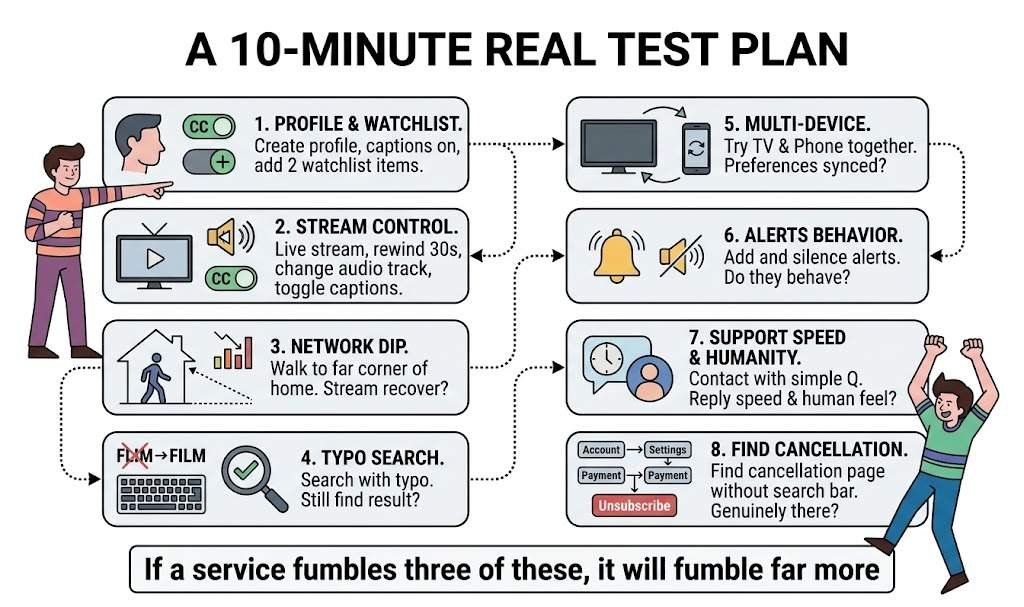
- Create a profile, switch captions on, and add two items to your watchlist
- Start a live stream, rewind 30 seconds, switch the audio track, and toggle captions
- Let your network dip by walking to the far corner of your home. Does the stream recover cleanly?
- Search with a deliberate typo. Do you still find what you wanted?
- Try the service on your TV and phone at the same time. Are preferences properly synced?
- Add and then silence a set of alerts. Do they actually behave?
- Contact support with a simple question. How fast is the reply, and how human does it feel?
- Find the cancellation page without using the search bar. Is it genuinely there?
If a service fumbles three of these, it will fumble far more once you are properly invested.
Two Stacks That Make Sense for UK Households
- Weeknight solo viewing: big screen on a stable, low-latency 1080p at 60fps feed, phone alongside with a glanceable tile for scores or “continue watching,” a clean live centre for quick context during kettle breaks, and alerts trimmed back to the moments that actually matter.
- Weekend with friends: the most reliable high-quality feed your broadband can comfortably hold, captions on for noisy rooms, phones set to quiet with a hub for replays between overs or scenes, and one shared group chat that adds commentary rather than chaos.
Final Thoughts
Choose the platform that respects your time above all else. Streams that start fast, controls where your thumbs expect them, context that genuinely explains, payments that do not surprise you, and exits that do not punish you for leaving. Shiny features fade quickly. Friction, on the other hand, sticks around and wears you down.
If a service lets you drop in from a train, catch up in a minute, and share the good parts with friends without anyone needing a tutorial, it is almost certainly the one you will still be enjoying in six months.
Disclaimer
This article is intended for general information purposes only and reflects the author’s personal research and observations at the time of publication. It does not constitute professional, legal, financial, or technical advice, and readers should not act solely on the basis of the content without seeking appropriate guidance for their individual circumstances.
Mentions of specific platforms, services, brands, or products are illustrative and do not constitute endorsements. Availability of content, pricing structures, subscription terms, regional rights, and platform features change regularly, and readers are encouraged to verify the latest details directly with each provider before making a purchase or subscription decision.
Where this article discusses matters relating to consumer rights, online safety, accessibility, or licensed services such as regulated gaming, readers in the United Kingdom should consult the relevant official bodies, including Citizens Advice, the Competition and Markets Authority, Ofcom, the Information Commissioner’s Office, and the UK Gambling Commission, for authoritative guidance. External links included in this article point to third-party websites over which the author has no control, and their inclusion does not imply any responsibility for their content, policies, or accuracy.
Every effort has been made to ensure the information in this article is accurate at the time of writing. However, neither the author nor the publisher accepts any liability for errors, omissions, or outcomes arising from the use of this information.
References
- Chadwick, D., Wesson, C. and Fullwood, C. (2013) Internet Access by People with Intellectual Disabilities: Inequalities and Opportunities, Future Internet, 5(3), pp. 376–397. DOI: 10.3390/fi5030376
- Lewthwaite, S. (2014) Web accessibility standards and disability: developing critical perspectives on accessibility, Disability and Rehabilitation, 36(16), pp. 1375–1383. DOI: 10.3109/09638288.2014.938178
- Wu, T., Jiang, N., Jaya Kumar, T.B. and Chen, M. (2024). The role of cognitive factors in consumers’ perceived value and subscription intention of video streaming platforms: a systematic literature review, Cogent Business and Management, 11(1), 2329247. DOI: 10.1080/23311975.2024.2329247
- Zhang, Y. (2024). Assessing the quality of experience in wireless networks for multimedia applications: A comprehensive analysis utilizing deep learning-based techniques, Heliyon, 10(9), e30351. DOI: 10.1016/j.heliyon.2024.e30351