
A viral clip on X can disappear before your tea gets cold.
One minute, everyone is sharing the same funny video, match moment, news clip, street interview, recipe trick, or meme. A few hours later, the post is gone, the account is private, or the video will not load anymore.
That is why many people want a simple way to save Twitter videos before they vanish.
You do not need a paid app. You do not need to install strange software. You do not need to give your X login to any website. You only need the post link, a browser, and a safe way to download the video file.
For most people, the easiest method is to copy the post link and paste it into xdownloader.io, a free browser-based tool that turns the video into a normal MP4 file without asking you to install an app.
This method works on iPhone, Android, Windows, and Mac. The steps are almost the same on every device, which makes it simple even if you are not a tech person.
Here is what you will learn in this article:
- How to save Twitter videos without an app
- How to download X videos on mobile and desktop
- How to choose MP4 or MP3
- Where saved videos go on iPhone and Android
- Why some videos will not download
- How to stay safe from bad downloader apps
- How to respect copyright and creator rights
- How to keep saved clips neat and easy to find
Why Twitter Videos Can Disappear So Quickly
Videos on X do not always stay online forever.
The person who posted the clip can delete it. The account can become private. The post can be removed after a complaint. Sometimes the same clip is reposted many times, but the original one still disappears.
That is why saving a useful clip early can save you from searching for it later.
| Why A Video Disappears | What It Means For You |
|---|---|
| The person deletes the post | The video may no longer open |
| The account becomes private | You may lose access to the clip |
| The account is suspended | The post can disappear with the account |
| A copyright report is made | The video may be restricted or removed |
| The clip is buried by new trends | You may not find it again |
| The post link gets shared wrong | You may open the wrong page later |
A clip may look easy to find today because everyone is talking about it.
Tomorrow, the same clip may be hidden under thousands of new posts.
A Real-Life Example Most People Know
Think about a sports clip.
A player scores a strange goal, a fan catches it on camera, and someone posts it on X. It goes viral fast. People repost it, quote it, joke about it, and add edits.
Later, the original poster deletes it because the clip used broadcast footage. Now the link you saved in your bookmarks does not help.
That is the exact moment when a saved MP4 file becomes useful.
Useful clips worth saving early include:
- Breaking news videos
- Short tutorials
- Recipe clips
- Match highlights
- Funny animal videos
- Tech demos
- Street interviews
- Public event clips
- Memes you want to keep
- Your own uploaded videos
What Saving A Twitter Video Really Means
Saving a Twitter video means turning the video from a post into a normal file on your device.
Most of the time, that file is an MP4. MP4 is a common video format. It works on phones, computers, media players, editing apps, and cloud storage.
You are not saving the full post. You are saving the video inside the post.
| Term | Simple Meaning |
|---|---|
| Twitter video | A video posted on X |
| X video | The same video, using the newer platform name |
| MP4 | A normal video file with picture and sound |
| MP3 | An audio-only file |
| Post link | The link to the exact post with the video |
| Downloader | A tool that turns the post video into a file |
| Browser-based tool | A website that works without installing an app |
The most important part is the post link.
If you copy the wrong link, the downloader may not find the video.
Why A Normal Save Button Is Not Always There
X does have video download features for some users and some videos. The official X Help Center video page explains that certain videos may be downloadable by Premium subscribers, and uploaders can control whether their videos can be downloaded.
That means the download button is not always available to everyone.
This is why many users look for an app-free browser method.
Common reasons you may not see a download button include:
- You are not using a Premium account
- The uploader turned downloads off
- The video was posted before certain download settings existed
- The account settings restrict downloads
- The post is not available anymore
- The app or browser is not showing the same options
The Safe Way To Think Before Downloading
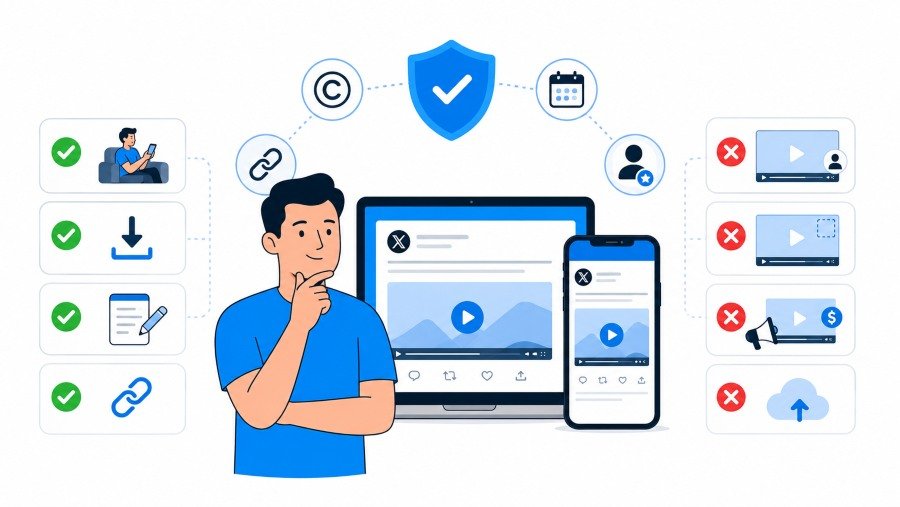
Before saving any clip, it is smart to think for a few seconds.
A public post does not mean the video is yours. Saving for personal use is different from reposting, editing, selling, or using someone else’s clip on a website.
The X Copyright Policy explains that X can respond to copyright complaints about videos, images, and other media. The U.S. Copyright Office Fair Use FAQ also explains that permission may be needed when using someone else’s work.
| Safer Use | Risky Use |
|---|---|
| Saving a recipe clip for personal viewing | Reposting the clip as your own |
| Saving your own uploaded video | Removing a creator’s watermark |
| Keeping a public tutorial for later | Using someone’s video in an ad |
| Saving a clip for research notes | Posting private or sensitive content |
| Sharing the original post link | Uploading the full video without permission |
This does not mean you should be scared to save a clip for later.
It simply means you should not treat a downloaded video like free content that belongs to you.
My Practical Rule For Saved Clips
Here is the simple rule I use for editorial work:
Save clips for memory, research, and reference. Ask before public reuse when the clip is not yours.
That one rule avoids most problems.
It also keeps your work cleaner because you keep the original source link with the saved video.
Good habits include:
- Save the original post link
- Save the account name if needed
- Save the date you found the clip
- Do not remove watermarks
- Do not repost private content
- Ask permission before using clips in public work
- Share the original post link when possible
The Fastest No-App Method For Mobile And Desktop
The easiest method is a browser-based downloader.
You copy the link from the X post, paste it into the tool, choose the format, and save the file. You do not need to install anything.
This is the best method for most normal users because it works on both phones and computers.
| Why This Method Is Useful | What It Helps With |
|---|---|
| No app needed | Keeps your phone cleaner |
| No X login needed | Helps protect your account |
| Works on mobile and desktop | One method for all devices |
| MP4 option | Saves full video |
| MP3 option | Saves audio only |
| Browser-based | Easy to use anywhere |
You can use this method when you only save clips sometimes.
If you save many clips every day for work, a desktop browser extension may feel faster, but for most people, the web method is enough.
What You Need Before You Start
You only need a few simple things.
Make sure the post still opens and the video still plays before you try to download it.
| What You Need | Why It Matters |
|---|---|
| The post link | The downloader needs the exact video post |
| A browser | Safari, Chrome, Edge, or Firefox can work |
| Internet connection | The tool needs to load the video |
| Storage space | Your device needs room for the MP4 |
| Permission to use the content | Important if you plan to repost or edit |
Do not use a tool that asks for your X password.
A normal Twitter video downloader should only need the post link.
Copy The Correct X Video Link
This is where many people make the first mistake.
They copy a profile link, search link, reply link, or repost link instead of the exact post that contains the video. Then the downloader cannot find the media.
The safest way is to open the post by itself first.
| Device | Best Way To Copy The Link |
|---|---|
| iPhone | Tap the share button under the post and copy the link |
| Android | Tap the share button under the post and copy the link |
| Windows | Open the post, click share, then copy link |
| Mac | Open the post, click share, then copy link |
| Mobile browser | Open the post page and copy the post link |
After copying, paste the link into a notes app for a second if you want to check it.
A correct post link should open the same post with the same video.
How To Know You Copied The Wrong Link
Wrong links are easy to spot once you know the signs.
If the downloader says no video found, do not panic. The link may simply be wrong.
| Sign | Likely Problem |
|---|---|
| The page opens a profile | You copied the account link |
| The page opens a search result | You copied a search URL |
| The page opens a thread but no video | The video is in another post |
| The page opens a quote post | The original video may be elsewhere |
| The downloader says no media found | Wrong link or removed post |
Fix it by opening the exact post with the video and copying again.
This solves many failed downloads.
Choose MP4 When You Want The Full Video
For most people, MP4 is the correct choice.
MP4 saves the video and the sound together. It works well for funny clips, tutorials, reaction videos, gaming clips, sports moments, and news clips.
If you want to watch the clip later, choose MP4.
| Format | Best For |
|---|---|
| MP4 | Full video with sound |
| MP3 | Audio only |
| Higher quality MP4 | Clear viewing and editing |
| Lower quality MP4 | Smaller file size |
| Original quality where available | Best saved copy |
A cooking clip should be MP4 because you need to see the steps.
A speech clip may be fine as MP3 if the picture does not matter.
When MP3 Makes More Sense
Sometimes the audio is the main part.
Maybe the post is a speech, interview, sound bite, song preview, or podcast-style video. In that case, MP3 may be useful.
| Good MP3 Use | Better Choice |
|---|---|
| Saving a short speech | MP3 |
| Keeping an interview answer | MP3 |
| Saving a sound bite for notes | MP3 |
| Saving a recipe tutorial | MP4 |
| Saving a gaming clip | MP4 |
| Saving a sports moment | MP4 |
Be careful with music.
Saving only the audio does not remove copyright concerns.
Save Twitter Videos On iPhone Without Installing An App
iPhone users often get confused because the file may not go straight into the Photos app.
Many downloads first appear in the Files app. This is normal.
Apple explains where downloaded files appear in its official page on finding downloads on iPhone or iPad. The main thing to remember is to check the Files app and the Downloads folder.
| iPhone Place | What To Look For |
|---|---|
| Safari download button | Shows recent downloads |
| Files app | Stores many downloaded files |
| iCloud Drive Downloads | Common Safari download location |
| On My iPhone | Another possible local location |
| Photos app | May need manual saving from Files |
After the MP4 downloads, open the Files app.
Tap the video. If it plays, the download worked.
How To Move The Video To Photos On iPhone
Some people want the video in Photos because it is easier to find and share privately.
Open the MP4 file from Files. Tap the share button. Look for the option to save video.
| What You Want | What To Do |
|---|---|
| Watch only once | Open from Files |
| Keep in camera roll | Save video to Photos |
| Send to yourself | Use share menu |
| Store for work | Move to a folder |
| Keep source notes | Save link in Notes app |
If you cannot see the save option, check that the file is fully downloaded.
A half-downloaded file may not behave like a normal video.
Save Twitter Videos On Android Without Installing An App
Android usually makes downloads easy to find.
After you save the MP4 from your browser, check Downloads, File Manager, or Files by Google. Google’s official page on viewing files on Android explains that the Files app can show recent, downloaded, and modified files.
| Android Place | Why It Helps |
|---|---|
| Downloads folder | Most browser downloads go here |
| Files by Google | Easy place to find recent files |
| Gallery app | Some MP4 files appear here |
| Chrome downloads | Shows download history |
| Internal storage | Useful when files are hidden deeper |
If the video does not appear in Gallery, it may still be saved.
Open Files and check the Downloads folder.
Android Download Tips That Save Time
Android phones can differ by brand.
Samsung, Xiaomi, Oppo, Vivo, Pixel, and other phones may use slightly different file apps. The idea is still the same.
Useful Android habits include:
- Use Chrome or your normal browser
- Check Downloads first
- Open Files if Gallery does not show the video
- Rename important clips
- Move clips into folders
- Delete failed downloads
- Keep enough storage free
If your phone storage is full, the download may fail or stop halfway.
Save Twitter Videos On Desktop Without Installing Software
Desktop saving is simple because files usually go to the Downloads folder.
Open X in your browser. Copy the post link. Paste the link into the browser downloader. Choose MP4. Save the file.
Google’s official Chrome download help page explains how downloads normally work in Chrome and how files can be saved from a browser.
| Desktop Device | Common Download Place |
|---|---|
| Windows laptop | Downloads folder |
| Windows desktop | Downloads folder |
| MacBook | Downloads folder |
| iMac | Downloads folder |
| Chromebook | Files app downloads area |
The desktop method is good if you want to rename files, store clips in folders, or move videos to an editing tool.
Desktop Habits That Keep Files Clean
A desktop Downloads folder can become messy fast.
Rename the file right after saving it. Then move it to a folder that makes sense.
| Messy File Name | Cleaner File Name |
|---|---|
| video.mp4 | funny-cat-window-reaction.mp4 |
| download.mp4 | football-goal-last-minute.mp4 |
| xclip284.mp4 | phone-camera-test.mp4 |
| mediafile.mp4 | pasta-sauce-tip.mp4 |
| audio.mp3 | interview-short-answer.mp3 |
A clear name helps you find the clip later.
You should not need to open ten videos just to find one short clip.
What To Do When The Download Opens In A Video Player
Sometimes the file does not download right away.
Instead, it opens in a small video player inside the browser. This is common on phones and some desktop browsers.
Look for the three-dot menu inside the player and choose download.
| What You See | What To Do |
|---|---|
| Video opens in browser | Use the player menu |
| Three-dot menu appears | Tap or click download |
| Video starts playing | Pause it and look for save option |
| No download button | Try another browser |
| File opens but does not save | Use save as on desktop |
Do not close the page too quickly.
Give the browser a moment to start the download.
Why This Happens
Browsers handle media files in different ways.
Some browsers download the file right away. Others try to play the file first because MP4 is a media format.
This is not usually an error.
Simple fixes include:
- Wait for the player to load
- Tap the three-dot menu
- Choose download
- Try long-pressing the video on mobile
- Try another browser if needed
- Check browser downloads after tapping
Why Some Twitter Videos Will Not Download
Not every video can be saved through a normal web method.
Sometimes the post is private. Sometimes the video is already gone. Sometimes the copied link is wrong. Sometimes the platform blocks access.
A downloader can only work with what it can reach.
| Problem | Likely Reason | Simple Fix |
|---|---|---|
| No video found | Wrong post link | Copy the exact post link again |
| Page keeps loading | Slow internet | Try again on Wi-Fi |
| File has no sound | Original may have no audio | Play the post on X first |
| Download fails | Browser blocked it | Check download settings |
| Video will not open | File may be incomplete | Delete and download again |
| Link does not work | Post may be deleted | Search for the original source |
If the post itself will not open on X, a downloader may not help.
Try to find the same clip from a trusted public source instead.
A Quick Troubleshooting Table
Use this before trying ten different tools.
| Check | Why It Matters |
|---|---|
| Does the post still open? | Removed posts may not work |
| Does the video play on X? | The media must be available |
| Did you copy the post link? | Profile links do not work |
| Is the account private? | Private content may be blocked |
| Is your browser blocking downloads? | Settings can stop saving |
| Is your phone storage full? | Downloads need space |
Most failed downloads come from a wrong link or a removed post.
Start there first.
How To Avoid Unsafe Downloader Apps
Many people search for a Twitter video saver and end up installing an app they do not need.
Some apps may be fine, but many ask for too many permissions. A simple video download should not need your contacts, messages, microphone, or X password.
The FTC has a useful safety page about malware and how to protect your device. It is worth reading if you often download files or try new tools online.
| Safe Sign | Warning Sign |
|---|---|
| Tool only asks for a post link | Tool asks for your X password |
| Works in browser | Forces software install |
| Gives MP4 or MP3 options | Opens many strange pop-ups |
| Lets you close the page easily | Pushes fake warning messages |
| Does not ask for personal data | Requests email, login, or payment first |
Do not give your X login to a downloader site.
That is not needed for normal public video saving.
Simple Safety Rules
Keep the process boring and simple.
Copy the link. Paste it. Download the file. Close the page.
Good safety habits include:
- Use a browser tool instead of random apps
- Do not enter passwords
- Do not install unknown files
- Do not click fake warning pop-ups
- Keep your browser updated
- Scan strange downloads if needed
- Delete files you do not trust
A video is not worth risking your phone, laptop, or account.
MP4 Download Vs Screen Recording
Screen recording is another way people save Twitter videos.
It works sometimes, but it is not always the best method. A screen recording can capture buttons, notifications, black bars, low sound, and poor quality.
An MP4 download is usually cleaner.
| Method | Best For | Main Problem |
|---|---|---|
| MP4 download | Clean saved copy | Needs a working post link |
| Screen recording | Quick personal capture | Lower quality and messy screen |
| Bookmarking | Finding post later | Post can disappear |
| Sharing link | Sending source to someone | Link may stop working |
| MP3 save | Audio-only use | No video picture |
Screen recording can also record private notifications by mistake.
If you use it, turn on Do Not Disturb first.
When Screen Recording May Be Enough
Screen recording can be fine for personal memory when the normal download method fails and the content is allowed to be saved.
Still, it should not be your first choice.
Use screen recording only when:
- The post is public
- You are saving for personal use
- You do not need top quality
- No private information is on screen
- You are not reposting without permission
For clean clips, MP4 is better.
How To Save Clips For Work, Study, Or Research
Saved videos can be useful for more than entertainment.
Bloggers, students, social media managers, journalists, and researchers may save public clips for notes, trend tracking, commentary, or later review.
The mistake is saving the file without context.
| Detail To Save | Why It Helps |
|---|---|
| Original post link | Lets you check the source |
| Account name | Helps with credit |
| Date saved | Shows when you found it |
| Topic | Helps with sorting |
| Short note | Explains why the clip matters |
| Usage limit | Reminds you not to repost freely |
A saved video without context can become confusing.
You may forget where it came from or what it was supposed to prove.
A Simple Note Template
You can keep a note like this beside important clips.
| Field | Example |
|---|---|
| Clip title | Train station crowd video |
| Source link | Original X post link |
| Account | Account that posted the clip |
| Date saved | July 2026 |
| Topic | Public transport delay |
| Use | Research reference only |
This takes less than a minute.
It can save you from using a clip in the wrong way later.
How To Organise Saved Twitter Videos
If you download many clips, your Downloads folder will turn into a junk drawer.
A simple folder system helps a lot.
You do not need a complex system. Use plain folder names that match how you use clips.
| Folder Name | Best For |
|---|---|
| Funny Clips | Memes and jokes |
| Tutorials | How-to videos |
| News Clips | Public events |
| Work References | Content ideas |
| Sports Clips | Match moments |
| Audio Saves | MP3 files |
| Personal Archive | Clips you want to keep |
Move important videos out of Downloads after saving them.
Downloads should be a waiting room, not a permanent home.
File Naming Tips
Good names make old clips easy to find.
Bad names waste time.
| Bad Name | Better Name |
|---|---|
| video.mp4 | dog-opens-door-funny.mp4 |
| clip.mp4 | iphone-camera-test-night.mp4 |
| download.mp4 | quick-pasta-recipe.mp4 |
| media.mp4 | cricket-catch-boundary.mp4 |
| audio.mp3 | mayor-interview-answer.mp3 |
Use simple words.
Do not make names too long.
How To Keep Video Quality As High As Possible
A downloaded video can only be as clear as the original upload.
If the original clip is blurry, the download will not become sharp. But you can still choose the best available version.
Always choose the highest MP4 option when quality matters.
| Quality Tip | Why It Helps |
|---|---|
| Choose highest MP4 quality | Gives the clearest file |
| Use Wi-Fi | Reduces failed downloads |
| Avoid screen recording | Keeps the file cleaner |
| Check file size | Tiny files may be low quality |
| Watch after downloading | Confirms the full clip saved |
For important clips, play the saved file before closing the page.
Make sure it has sound, full length, and clear picture.
Why Some Clips Still Look Blurry
X may compress videos.
The original uploader may also upload a low-quality file. If that happens, the downloader cannot fix it.
Common quality limits include:
- Low-quality original upload
- Poor lighting in the video
- Heavy platform compression
- Screen-recorded source clip
- Reposted copy of a reposted copy
- Weak internet during upload
The best copy is usually from the original post, not a repost.
How To Find Downloaded Videos Later
Finding the saved file is sometimes harder than downloading it.
Each device handles downloads a little differently. The main places to check are Downloads, Files, Gallery, Photos, and browser download history.
| Device | First Place To Check |
|---|---|
| iPhone | Files app |
| Android | Downloads folder |
| Windows | Downloads folder |
| Mac | Downloads folder |
| Chromebook | Files app |
| Chrome browser | Download history |
If you just downloaded the file, your browser may show it at the top or bottom of the screen.
Tap or click it from there before you forget where it went.
When The File Seems Missing
The file may not be missing.
It may be saved under a strange name or placed in a folder you did not expect.
Try these checks:
- Open browser download history
- Search for “mp4” in Files
- Sort Downloads by newest first
- Check iCloud Drive Downloads on iPhone
- Check Files by Google on Android
- Look in Gallery or Photos
- Try the download again if the file is tiny
A failed download may leave a broken file.
Delete it and save a fresh copy.
How To Save Only Your Own Twitter Videos
Saving your own videos is one of the safest uses.
Maybe you posted a clip months ago and no longer have the original file. You can use the same copy-link method to save your own post video.
This is helpful for creators who post from different devices.
| Why Save Your Own Videos | Benefit |
|---|---|
| Backup | Keeps your content safe |
| Reuse | Helps with future edits |
| Portfolio | Saves your best clips |
| Device change | Recovers files from old posts |
| Content planning | Lets you group old work |
If it is your own video, you still need to keep it organised.
Do not rely on X as your only storage place.
Simple Backup Setup
A light backup system is enough.
You can keep your best videos in a folder on your computer, then copy that folder to cloud storage or an external drive.
Useful backup folders include:
- Posted videos
- Raw clips
- Edited clips
- Best performers
- Client clips
- Personal archive
A platform account is not a backup plan.
Keep your own copy.
What Content Creators Should Be Careful About
Creators often save viral clips to study trends.
That is normal. The risky part is reposting someone else’s video without permission, especially if you use it for growth, money, or brand promotion.
A saved file should be treated as reference material unless you have rights to use it.
| Creator Activity | Safer Approach |
|---|---|
| Studying trends | Save clip and source link |
| Making commentary | Use only what is needed and add clear value |
| Reposting a full clip | Ask permission first |
| Making ads | Get written permission |
| Editing someone’s clip | Credit and permission matter |
| Using news footage | Check source and rights |
Do not remove watermarks.
Do not crop out creator names.
Do not pretend a clip is yours.
Expert Note For Content Work
A practical content rule is this:
If the clip creates value for your post, the original creator deserves clear credit or permission.
That is not just about rules.
It is also about trust. Readers and viewers notice when content is taken without care.
Why Bookmarking Is Not Enough
Many people think bookmarking a post is the same as saving the video.
It is not.
A bookmark only saves a path back to the post. If the post disappears, the bookmark may lead nowhere.
| Bookmarking | Downloading |
|---|---|
| Saves the post link | Saves the video file |
| Depends on post staying live | Works offline after saving |
| Easy inside X | Needs a browser tool |
| Good for quick return | Better for long-term keeping |
| Can fail if deleted | Still works if your file is saved |
Bookmarks are still useful.
Use them with downloads when the clip matters.
Best Practice
For important clips, save both.
Download the MP4 and keep the original link in a note.
This gives you the video file and the source context.
Good saved records include:
- MP4 file
- Original post link
- Creator name
- Date saved
- Short topic note
- Permission status if needed
What To Do If A Post Is Private
Private posts should be handled carefully.
If an account is private, the person has chosen to limit who can see their content. Even if you can view it as a follower, that does not mean you should download or share it.
Respect the privacy setting.
| Situation | Better Choice |
|---|---|
| Private account video | Do not repost it |
| Friend shared a private clip | Ask before saving or sharing |
| Sensitive personal content | Do not download |
| Public interest issue | Look for verified public sources |
| School or family content | Keep it private or avoid saving |
Public tools may not work with private posts anyway.
That is a good thing.
What To Do If The Video Was Deleted
If the video is already deleted, a normal downloader may not be able to help.
The tool needs access to the post. If the post is gone, the video may be gone too.
Do not trust websites that claim they can recover any deleted video.
| Deleted Video Situation | What You Can Try |
|---|---|
| Post is gone | Search for the same clip from trusted sources |
| Account is suspended | Look for official uploads |
| Clip was news-related | Check news outlets or public agencies |
| Clip was a meme | Search the caption or key phrase |
| Clip was private | Let it go |
If the clip matters for research, do not use random reuploads without checking context.
Old clips are often shared with false captions.
How To Spot Misleading Reposted Videos
A video can be real and still be used in a misleading way.
Someone may repost an old clip and claim it happened today. Someone may say it happened in one country when it happened somewhere else.
Saving the video is not enough. You should also save context.
| Warning Sign | What It May Mean |
|---|---|
| No source named | Clip may be copied |
| Big claim with no details | Context may be weak |
| Old replies mention another date | Clip may be old |
| Different accounts share different stories | Context may be unclear |
| No original poster found | Treat carefully |
For serious topics, look for official or trusted sources before using the clip.
Do not build an article or claim around an unverified video.
Simple Verification Habits
You do not need to be a professional fact-checker to be more careful.
Try these habits:
- Check the post date
- Read replies for context
- Search key words from the caption
- Look for the earliest upload
- Check if trusted outlets covered it
- Avoid using clips with unclear source
- Keep a note if context is uncertain
This is especially important for news, health, politics, accidents, and public safety clips.
Should You Use Browser Extensions?
Browser extensions can make saving faster on desktop.
Some add a download button directly inside X. That can be useful if you save videos often for editing, research, or social media work.
But extensions are not needed for most people.
| Browser Tool | Browser Extension |
|---|---|
| No install needed | Install required |
| Works on phone and desktop | Mostly desktop |
| Good for occasional saves | Good for frequent saves |
| Lower permission risk | Permissions need checking |
| Easy to stop using | Must remove if unwanted |
If you use an extension, choose carefully.
Check reviews, permissions, update history, and the developer.
Extension Safety Checklist
Do not install the first extension you see.
A bad extension can collect more data than you expect.
Check these points:
- Does it come from an official browser store?
- Does it have real reviews?
- Does it ask for too many permissions?
- Has it been updated recently?
- Does it have a clear privacy policy?
- Can you remove it easily?
- Does it work only on X or many sites?
For most users, a web method is still simpler.
How To Save Twitter Videos For Offline Watching
Offline viewing is one of the best reasons to save a clip.
Maybe you want to watch it during travel, weak internet, or study time. Once the MP4 is saved, you can open it without loading X again.
This is useful for short lessons, recipe steps, repair tips, and personal clips.
| Offline Use | Why MP4 Helps |
|---|---|
| Travel | Works without mobile data |
| Study | Easy to replay |
| Cooking | Keeps steps close |
| Exercise | Lets you watch a movement again |
| Work notes | Helps with later review |
Before going offline, open the video once.
Make sure it plays properly.
Storage Reminder
Videos can take more space than you expect.
A few short clips are fine. Many HD clips can fill your phone quickly.
Good storage habits include:
- Delete clips you no longer need
- Move work clips to cloud storage
- Keep only useful videos
- Clear failed downloads
- Avoid saving the same clip twice
- Check storage before a large download
A clean phone works better.
How To Share Saved Videos Without Being Careless
Sharing the original X link is usually safer than uploading the saved file somewhere else.
The original link keeps the creator attached to the post. It also keeps replies, date, and context visible.
Uploading the saved video can remove all of that.
| Sharing Choice | Better For |
|---|---|
| Share original post link | Credit and context |
| Send saved file privately | Personal use with care |
| Repost full video | Needs permission |
| Use in brand content | Needs clear rights |
| Use short clip in commentary | Still needs caution |
If you are not sure, share the link.
That is the safest habit for normal users.
When Permission Matters Most
Permission matters more when money, branding, or public reach is involved.
Ask before using another person’s video in:
- Ads
- Sponsored posts
- YouTube videos
- Website articles
- Brand social media
- Paid courses
- Client work
- Edited compilations
A quick message asking permission is better than a later complaint.
Common Problems And Easy Fixes
Most problems have simple causes.
Before trying many different tools, check the post link, browser, storage, and internet connection.
| Problem | Simple Fix |
|---|---|
| Downloader cannot find video | Copy the exact post link again |
| Download does not start | Check browser download settings |
| File opens but does not save | Use the video player download menu |
| Video has no sound | Check if original video has sound |
| File will not play | Download again |
| iPhone cannot find file | Check Files app and Downloads |
| Android cannot find file | Check Files by Google and Downloads |
| Desktop cannot find file | Check browser download history |
If Chrome shows download problems, Google also has a help page for download errors. But most basic saves work once the file link is correct.
Quick Fix Table By Device
| Device | First Fix To Try |
|---|---|
| iPhone | Check Files app |
| Android | Check Downloads folder |
| Windows | Check Downloads folder |
| Mac | Check Downloads folder |
| Chrome | Open download history |
| Safari | Tap download icon |
| Firefox | Check downloads panel |
Do not keep tapping download many times.
You may end up with many copies of the same video.
Handy Workflow For Saving A Clip Fast
Here is a simple workflow you can use every time.
No extra app. No account login. No messy steps.
| Action | What To Do |
|---|---|
| Find the post | Open the post with the video |
| Copy the link | Use the share button |
| Open browser tool | Paste the post link |
| Pick format | Choose MP4 for video |
| Save file | Download to your device |
| Check file | Play it once |
| Rename file | Use a clear name |
| Save source | Keep the original post link |
Once you repeat this a few times, it becomes very quick.
The real value is not just saving the clip. It is saving it in a way you can find later.
My Best Advice For People Who Save Lots Of Clips
Do not build a pile of random videos.
Build a small archive.
A good archive has:
- Clear file names
- Topic folders
- Source links
- Dates
- Creator names when needed
- Notes for important clips
- Regular cleanup
This makes your saved videos useful instead of messy.
Frequently Asked Questions
Can I Save Twitter Videos Without Installing An App?
Yes, you can save Twitter videos without installing an app.
Use a browser-based downloader. Copy the X post link, paste it into the tool, choose MP4, and save the file.
| Best For | Why |
|---|---|
| Occasional users | No app needed |
| iPhone users | Works in Safari |
| Android users | Works in Chrome |
| Desktop users | Saves to Downloads folder |
| Privacy-focused users | No login needed |
Do not use any tool that asks for your X password.
Can I Save Twitter Videos On iPhone?
Yes, you can save Twitter videos on iPhone using Safari or Chrome.
The file may go to the Files app first, not Photos. Check the Downloads folder inside Files.
| iPhone Issue | Fix |
|---|---|
| Cannot find video | Open Files app |
| Not in Photos | Save from Files to Photos |
| Download did not start | Check Safari downloads |
| File will not play | Download again |
| No storage | Clear space first |
Apple’s official download help page is useful if you often lose files after downloading.
Can I Save Twitter Videos On Android?
Yes, Android users can save Twitter videos through a browser.
After downloading, check Downloads, Files by Google, or your phone’s file manager.
| Android Issue | Fix |
|---|---|
| File not in Gallery | Check Downloads |
| Cannot find Downloads | Open Files by Google |
| File will not open | Download again |
| Download stopped | Use Wi-Fi |
| Storage full | Delete old files |
Android phones may look different by brand, but the main idea is the same.
Is MP4 The Best Format For Twitter Videos?
Yes, MP4 is the best format if you want the full video.
It keeps picture and sound together. It also works on most phones, computers, and editing tools.
| Need | Best Format |
|---|---|
| Watch full clip | MP4 |
| Save sound only | MP3 |
| Edit video | MP4 |
| Keep speech only | MP3 |
| Share privately | MP4 |
Choose MP3 only when the picture does not matter.
Why Does The Downloader Say No Video Found?
This usually means the link is wrong, the post is private, or the video is gone.
Open the exact post with the video and copy the link again.
| Cause | Fix |
|---|---|
| Wrong link | Copy post link again |
| Private account | Respect privacy |
| Deleted post | Search trusted public source |
| No video in post | Check the post |
| Browser issue | Try another browser |
Most failures are caused by copying the wrong link.
Is It Legal To Save Twitter Videos?
Saving for personal use is usually low risk, but reusing someone else’s video publicly can create copyright or privacy problems.
If you plan to repost, edit, or use the clip for work, ask permission or check the rules first.
| Use Case | Safer Choice |
|---|---|
| Personal viewing | Usually fine |
| Public repost | Ask permission |
| Brand use | Get written permission |
| Research | Keep source details |
| Commentary | Use care and credit |
Public does not mean free to reuse.
Can I Download Videos From Private X Accounts?
You should not try to download or share videos from private accounts without permission.
A private account means the person wants limited viewing.
| Situation | Better Action |
|---|---|
| Friend’s private video | Ask before saving |
| Sensitive clip | Do not save |
| School or family content | Keep private |
| Public interest issue | Find public source |
| Unclear permission | Do not repost |
Respect privacy first.
Why Is My Saved Twitter Video Blurry?
The original upload may be low quality, or X may have compressed it.
Choose the highest MP4 option when available.
| Cause | What To Do |
|---|---|
| Low-quality original | Cannot fully fix |
| Wrong quality chosen | Download higher option |
| Screen recording | Use MP4 download instead |
| Reposted clip | Find original post |
| Weak upload source | Look for better source |
A downloader cannot create detail that was not in the original file.
Can I Save Only The Audio From A Twitter Video?
Yes, if the downloader offers MP3.
This is useful for speech, interviews, or sound clips. Choose MP4 when the visual part matters.
| Content Type | Best Format |
|---|---|
| Speech | MP3 |
| Interview answer | MP3 |
| Song clip | MP3 for personal use only |
| Tutorial | MP4 |
| Meme video | MP4 |
Remember that audio can still be protected by copyright.
What Is The Safest Way To Save Twitter Videos?
The safest way is to use a browser-based method, avoid unknown apps, never enter your X password, and save only public clips you are allowed to keep.
Also keep the original post link if the clip matters.
| Safe Habit | Why It Helps |
|---|---|
| Use browser only | Avoids extra apps |
| Do not log in | Protects account |
| Save source link | Keeps context |
| Rename file | Easy to find |
| Respect copyright | Avoids trouble |
| Avoid private videos | Protects privacy |
A simple process is the best process.
Conclusion
Saving Twitter videos is not hard when you use the right method.
You do not need to install a random app, share your X password, or waste time searching for a clip after it disappears. A simple browser-based method is enough for most people.
The safest habit is to copy the correct post link, save the video as MP4, check where the file goes, and keep the original source link if the clip matters.
| Final Tip | Why It Matters |
|---|---|
| Save useful clips early | Viral posts can disappear fast |
| Use MP4 for full videos | It keeps picture and sound together |
| Avoid unknown apps | It protects your phone and account |
| Keep the source link | It helps with credit and context |
| Respect creator rights | A saved clip is not always free to reuse |
| Rename important files | You can find them later easily |
If you only want to watch a clip later, save it for personal use and keep it organised.
If you plan to repost, edit, or use someone else’s video for work, ask permission first. That small step keeps your content safer, cleaner, and more respectful.