Most fashion influencers need a wardrobe budget, a stylist, and a patient photographer. Yours needs one good image. Design a chrome-trimmed model in a holographic trench coat, run her through a talking photo workflow in Pippit, and suddenly she’s introducing your latest editorial in her own voice. She never gets tired, never misses a shoot, and always shows up in outfits that don’t exist yet. If you’ve wanted a futuristic style persona but weren’t sure where to begin, this walkthrough covers it. Open Pippit, grab your favorite fashion render, and follow along.
Designing a face the future would follow
Start with the look, because everything else hangs on it. Decide what era your influencer lives in. Is it a neon-lit 2090, or a quieter, minimalist future where clothes are grown instead of sewn? Write down three details that never change: hair, a signature accessory, and a color palette. Then generate or illustrate her in a front-facing pose with good lighting. A clear, centered face is gold here, since the animation relies on seeing her mouth and eyes properly. Skip busy backgrounds too. A plain or softly blurred one keeps attention on her, where it belongs.
Voice behind the look
A fashion persona lives or dies by how she sounds, and Pippit’s SeedAudio 1.5 gives you more control over that than you’d probably expect.
Four ways to start a voice
You can begin with text alone, text plus a reference voice, text plus a video, or all three combined. So a blank script and a fully shot lookbook reel are both perfectly good starting points.
Lines that land on the beat
You can mark the exact second a line, a sound effect, or a musical cue should arrive. That matters when her intro has to hit right as the outfit reveal flashes across the screen.
Room for a bigger cast
Up to six reference audios now work in one project, and a single generation can stretch to six minutes. That’s enough space for a model, a stylist, and a narrator to share one scene.
Three quick stops between concept art and your first post
Once the character and voice are settled, building the video takes about five minutes. Here’s the route inside Pippit.
Step 1: Load her portrait
To begin, log into Pippit and click on Video generator.
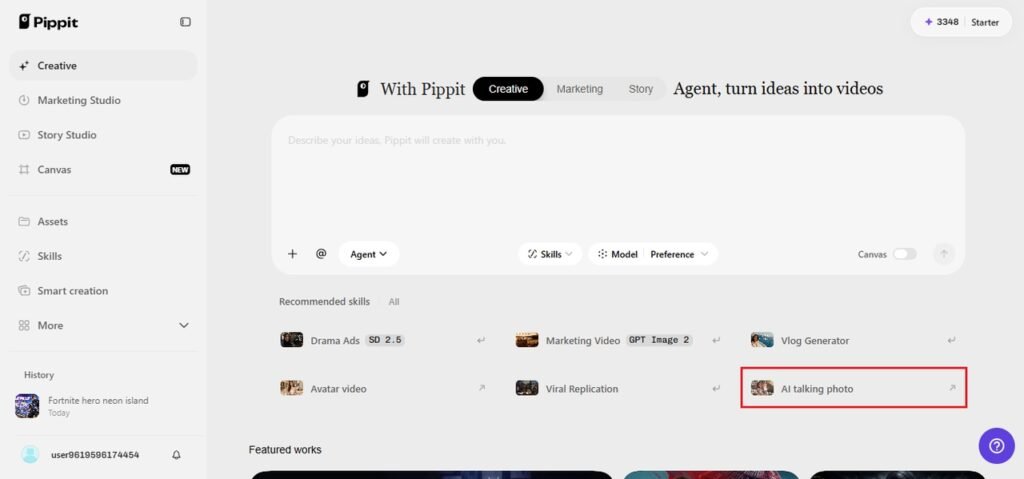
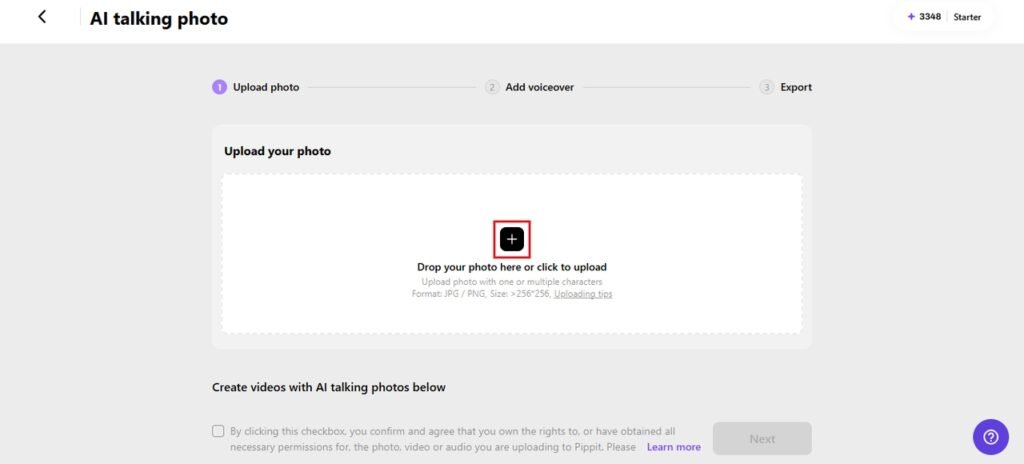
Choose the AI service that will bring a static image to life through speech. Upload the photo of the influencer. You may either tick the box or simply drag-and-drop the image. Please ensure that it is not smaller than 256×256 pixels. Finally, press Next.
Step 2: Write her opening line
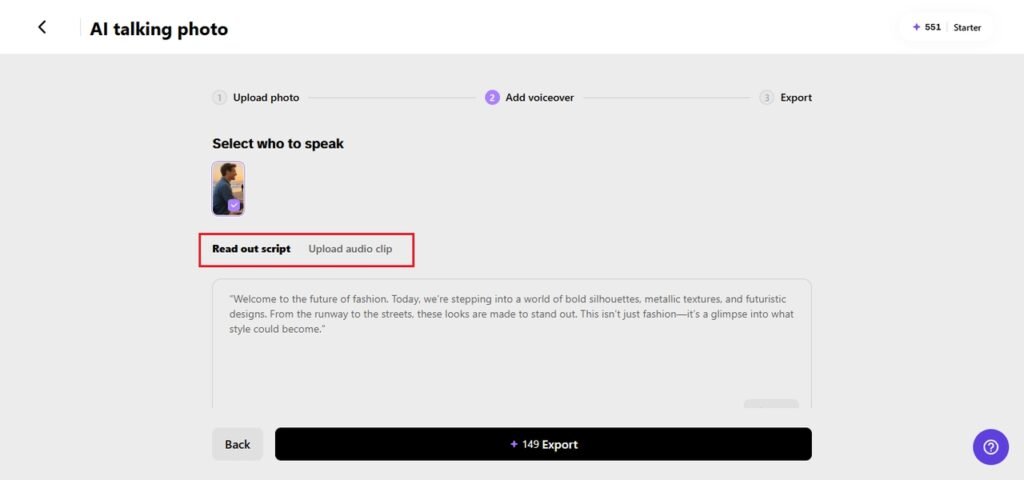
Pick Read out script and type what she’ll say. Choose the language, find a voice that suits her attitude, and switch on captions if you like, with a few styles to pick from. Hit Save. If you’d rather use your own recording, the Upload audio clip tab lets you add a file or select a trending sound.
Step 3: Export the editorial
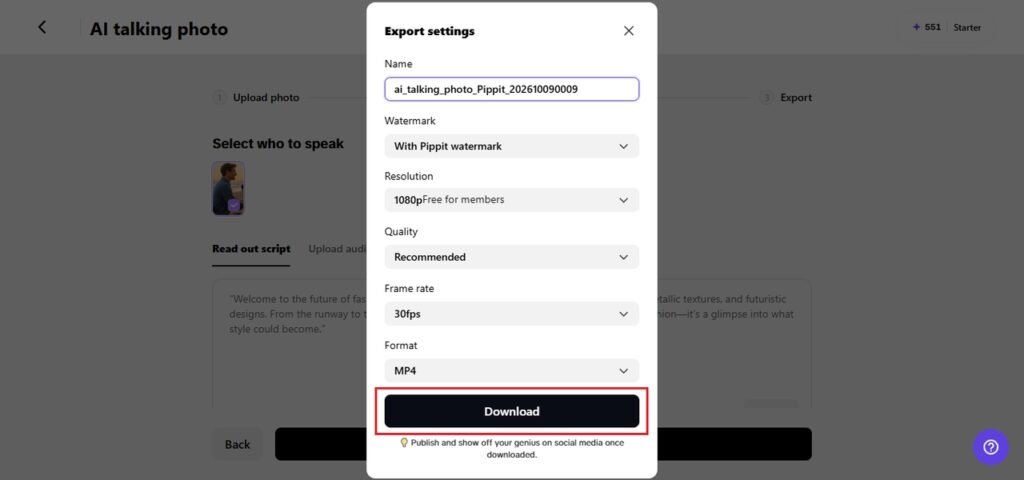
Press Export and rename the file. Decide whether to keep the watermark, and set your resolution, quality, frame rate, and format. When the settings look right, click Download and she’s saved to your device.
Questions people ask before they try it
A few things come up again and again, so here are quick answers.
- Does she have to be an illustration? Not at all. Renders, 3D models, and edited photos all work, as long as the face is clear.
- Can I clone a celebrity’s voice? No. Real people’s voices can’t be imitated without permission, and the audio model won’t produce copyrighted material either.
- How long can a clip run? Shorter suits social feeds, but the audio side handles up to six minutes if you’re building something longer.
- Do I need design skills? Only enough to describe what you want. A clear prompt gets you most of the way.
Scripts that sound like a stylist, not a brochure
The fastest way to ruin a virtual influencer is to give her lines that read like a product page. Real stylists speak in opinions. They say things like “this silhouette is doing too much, and I love it.” Write that way. Keep sentences short, throw in a question for the viewer, and let her be a little bold. Then read it aloud at normal speed. If it feels awkward in your mouth, rewrite it. Decide how she greets people and stick with it, because a repeated sign-on turns into part of her brand.
Editorial formats that suit a digital muse
Think beyond the single clip. A weekly trend report where she reviews imaginary fabrics gives followers a reason to come back. Lookbook intros work well too, with her narrating three outfits over a slow montage. You could also run a “future or flop” series, rating real-world trends from her vantage point in the year 2120. Each format uses the same setup, so once the first is done, the rest are mostly script changes. Mix them up now and then so the feed doesn’t start to feel like a template.
Keeping her look steady from post to post
Consistency does more for a virtual persona than any single clip. Save your original image and reuse it, rather than regenerating her face each time and hoping it matches. Pick one voice and stay with it. Keep the same caption style and framing as well, so followers recognize her from the thumbnail alone. When you want a new outfit, build it on the same base character instead of starting from scratch. And keep a short note listing her catchphrases and favorite colors, which saves you from guessing three weeks later.
Styling the narration like a magazine spread
Editorials have a rhythm, and your influencer’s script should follow it. Open with a bold statement about the look, move into two or three details such as fabric, silhouette, or color, and close with a line that leaves readers curious about the next issue. Keep a consistent vocabulary too. If she calls everything luminous or architectural, that quirk becomes part of her charm. Pair each clip with a matching caption so viewers scrolling silently still catch the point. A tidy, repeatable pattern makes a series feel like a real publication, and it saves you from reinventing the format every single week.
Your muse is waiting backstage
A futuristic fashion influencer used to demand a studio and a crew. Now it demands an idea and a few spare minutes. Pippit takes your concept art, gives it a voice, and hands back a clip you can post right away. The creative calls stay yours: the look, the attitude, the first line. So sketch her out, write something a little daring, and let her introduce herself. Head over to Pippit and start building your virtual style icon today.