


Remote work has changed what a home office can be. For many UK professionals, the office is no longer just a spare room, a desk in the corner, or a laptop at the kitchen table. It can now be a well-planned setup that travels with you.
A European cruise offers a different kind of working life. You can keep your routine, stay connected, and move between beautiful destinations without constantly packing bags, booking trains, changing hotels, or sitting in airport queues.
The idea is simple. You work while the ship sails. You wake up near a new city, answer emails from your cabin, take calls from a quiet lounge, finish your tasks, then enjoy a port visit, sea view, or evening meal.
This is not about escaping work. It is about making work feel calmer, more flexible, and more intentional.
What is an off-grid workstation?
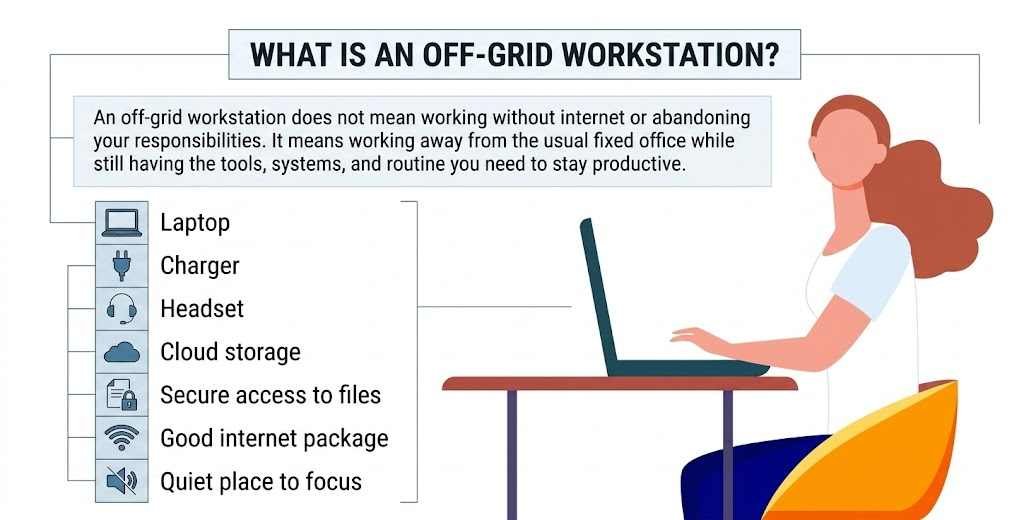
An off-grid workstation does not mean working without internet or abandoning your responsibilities. It means working away from the usual fixed office while still having the tools, systems, and routine you need to stay productive.
For remote workers, this might include a laptop, charger, headset, cloud storage, secure access to files, a good internet package, and a quiet place to focus.
A Modern Office Is No Longer Just One Place
The modern office is becoming more flexible. For some people, it is not a building at all. It is a portable system.
A good off-grid workstation helps you:
- Answer emails
- Join video calls
- Manage projects
- Share files safely
- Work across time zones
- Keep clients updated
- Stay organised while travelling
- Maintain a healthy work routine
Why a Cruise Works So Well
Working while travelling can be exciting, but it can also become stressful. Hotels, cafes, airports, short-term rentals, and train stations are not always reliable places to work.
A cruise gives you one base. Your cabin stays the same. Your luggage stays unpacked. Meals, cleaning, transport between destinations, and many daily comforts are already part of the experience.
This makes a cruise feel less like chaotic travel and more like a moving home office.
Why European Cruises Appeal to UK Remote Workers
For UK professionals, Europe is close enough to feel practical but varied enough to feel exciting. A European cruise can give you access to different cities, countries, coastlines, and cultures without making the journey feel complicated.
Easier Travel From the UK
Many European cruises can be reached from UK ports or by a short flight. This makes them easier to plan than long-distance trips.
For people who want a change of scenery without spending days in transit, a European route can be a sensible choice.
Manageable Time Zones
Time zones matter when you work remotely. If your employer, team, or clients are based in the UK, Europe is much easier to manage than many long-haul destinations.
In many European countries, the time difference from the UK is only one or two hours. This means you can still attend meetings, reply during normal working hours, and keep a familiar daily routine.
Travel Without Constant Repacking
One of the most tiring parts of working abroad is moving from place to place. Every new hotel means unpacking, checking the internet, finding food, and adjusting your routine again.
On a cruise, the ship moves for you. You can visit several places while keeping the same room, same bed, same desk area, and same daily routine.
Main Benefits of Working From a European Cruise
A European cruise can be more than a holiday. With the right planning, it can become a useful temporary workspace for remote professionals.
A Stable Base While You Travel
Your cabin becomes your private base. You can leave your laptop setup ready, keep your documents organised, and avoid the stress of moving every few days.
Why This Helps Productivity
When your surroundings are stable, you spend less energy solving small problems. You do not need to keep finding a new place to work, charge your laptop, or buy lunch.
That gives you more focus for your actual work.
A Natural Daily Routine
Cruises naturally create structure. Meals happen at regular times. Ports follow a schedule. Sailing days give you quiet hours for focused work.
For remote workers who struggle to stay disciplined while travelling, this rhythm can be useful.
Example of a Cruise Workday
| Time | What You Might Do |
|---|---|
| Morning | Emails, planning, client calls |
| Late morning | Focus work from your cabin |
| Afternoon | Admin, file reviews, light meetings |
| Late afternoon | Port visit, walk, gym, or rest |
| Evening | Dinner, relaxation, short check in if needed |
Fewer Daily Chores
At home, small chores can break up the working day. Cooking, cleaning, food shopping, laundry, and errands all take time.
On a cruise, many of these tasks are reduced. Meals, cabin cleaning, leisure spaces, and onboard facilities are usually handled for you.
This can make it easier to focus during working hours and relax properly afterwards.
Better Work Life Balance
A cruise can create a clearer line between work and rest. Once you close the laptop, you can walk on deck, watch the sea, visit the gym, enjoy dinner, or explore a new destination.
For people who work from home and struggle to switch off, this change of environment can feel refreshing.
Choosing the Right Cruise for Remote Work
Not every cruise is right for working. Some ships are noisy, busy, or built mainly around entertainment. Others are calmer and better suited to adults, professionals, and travellers who want space to think.
Check the Itinerary First
A packed itinerary can sound exciting, but it may not leave enough time to work properly. A slower route with sea days can be better if your job needs focus.
For UK professionals looking for Rhine River cruises, this type of route can be a practical starting point because it often offers calm sailing, scenic towns, easy port access, and a relaxed pace that suits remote work.
Cruise Routes That Can Work Well
| Cruise Type | Why It Can Help |
|---|---|
| River cruises | Calm, scenic, and often close to town centres |
| Mediterranean cruises | Good variety, warmer weather, and strong destination choice |
| Northern Europe cruises | Cooler weather, culture, history, and scenic ports |
| Rhine cruises | Relaxed pace, attractive towns, and easy sightseeing |
| Danube cruises | Historic cities, river views, and a steady rhythm |
Think About Ship Size
Large ships often have more facilities, but they can also feel busy. Smaller ships may feel quieter, but they may have fewer work-friendly areas.
Questions to Ask Before Booking
- Are there quiet lounges?
- Is there a desk in the cabin?
- Is the ship known for a calm atmosphere?
- Are there adult-only areas?
- Are public spaces usually crowded?
- Is there strong internet coverage?
- Can you work comfortably on sea days?
Choose the Cabin Carefully
If you are working onboard, your cabin matters. A basic inside cabin may be fine for sleeping, but it may feel too small for several workdays.
A cabin with natural light or a balcony can make the experience more comfortable.
Cabin Features Worth Looking For
- Desk or table space
- Comfortable chair
- Natural light
- Quiet location
- Enough plug sockets
- Good internet signal
- Space for a laptop and notes
- Safe storage for devices
Try to avoid cabins close to lifts, entertainment venues, laundry rooms, and busy corridors if you need quiet.
Internet and Connectivity
Good internet is the most important part of working from a cruise. Modern ships are much better connected than they used to be, but speed and reliability can still vary.
What to Check Before You Book
Do not assume the basic WiFi package will be enough for work. Some packages are only suitable for browsing and messaging.
Important WiFi Questions
- Is the internet included in the fare?
- Are faster packages available?
- Does the package support video calls?
- Is there a daily data limit?
- Does it work inside cabins?
- Can you use more than one device?
- Are there known weak signal areas on the route?
- Can you upgrade the package onboard?
Always Have a Backup Plan
Even good onboard internet can slow down. Weather, location, ship systems, and the number of people online can all affect performance.
Smart Backup Steps
- Download key files before sailing
- Keep offline copies of important documents
- Use cloud tools with offline access
- Bring mobile data for port days
- Schedule major calls for stronger connection times
- Use audio calls if video is unstable
- Tell clients when you may be at sea
- Finish urgent work before departure, where possible
What UK Travellers Should Think About First
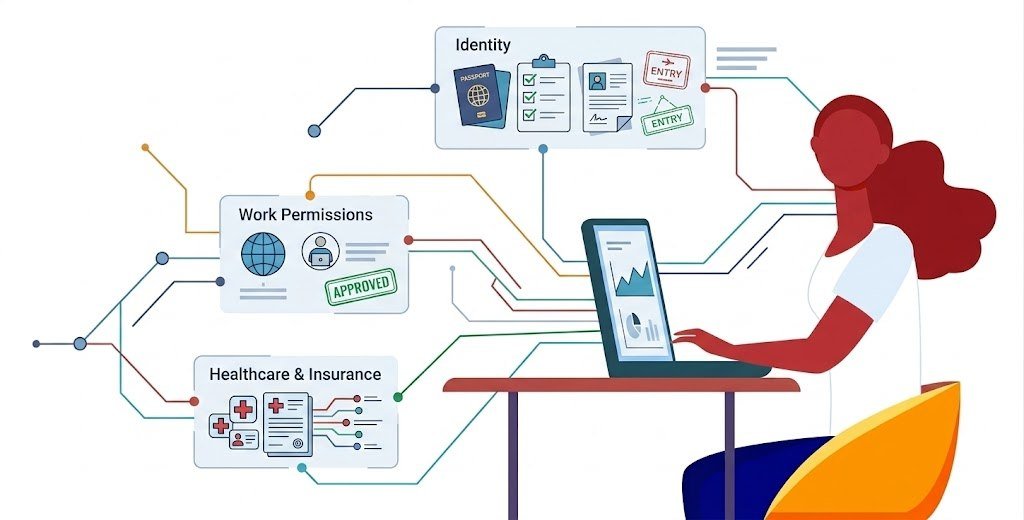
A cruise may feel simple, but UK travellers still need to think carefully about documents, insurance, work permission, healthcare, and employer rules.
Passport and Travel Rules
Before booking, check your passport validity and entry rules for every destination on your route.
Some cruises visit several countries, so you should understand how long you can stay, what paperwork you need, and whether any extra permission is required.
Working While Abroad
If a UK company employs you, do not assume you can work from another country without approval. Some employers have rules about overseas working, tax, insurance, data protection, and company devices.
If you are self-employed, you still need to think about client expectations, secure internet use, and whether your travel insurance covers work equipment.
Healthcare and Insurance
Travel insurance is very important for cruise travel. Do not rely only on basic cover.
Your Insurance Should Ideally Cover
- Cruise travel
- Medical treatment
- Emergency return to the UK
- Missed ports
- Lost luggage
- Lost or damaged work devices
- Trip cancellation
- Pre-existing medical conditions
- Remote work equipment, if relevant
Read the policy carefully before you travel. Some policies may not cover working while abroad unless you add extra cover.
Employer and Client Considerations
If you work for a company, get permission before booking a work-based cruise. This avoids problems later.
Questions to Ask Your Employer
Before You Travel
- Am I allowed to work outside the UK temporarily?
- Can I work from a cruise ship?
- Are there any countries I cannot work from?
- Can I use the ship’s WiFi with a company laptop?
- Do I need to use a secure connection?
- Are there data protection rules I must follow?
- Will I keep UK working hours?
- Do I need written approval?
If You Are Self-Employed
Freelancers and business owners may have more freedom, but they still need structure.
Helpful Steps for Freelancers
- Tell clients your working hours
- Avoid booking critical calls during uncertain connection periods
- Keep project files backed up
- Finish urgent work before departure
- Protect client data
- Give realistic delivery dates
- Keep invoices and admin organised
- Use quiet spaces for confidential calls
Building a Cruise-Friendly Work Kit
Your setup should be light, reliable, and easy to use in a small space.
Essential Items to Pack
| Item | Why It Helps |
|---|---|
| Laptop | Your main work device |
| Charger | Essential for daily work |
| Spare charger | Helpful if one fails |
| Noise cancelling headphones | Useful in shared areas |
| Mouse | More comfortable for long work sessions |
| Compact keyboard | Helpful if you prefer a better typing setup |
| Power bank | Useful during port visits |
| Travel adaptor | Needed for different plug types |
| Notebook | Useful for planning and ideas |
| USB backup drive | Helpful for important files |
| Laptop stand | Better posture in small spaces |
Security Items to Consider
- Password manager
- Two-factor authentication
- Device tracking
- Screen privacy filter
- Secure connection if required
- Encrypted storage
- Strong device password
- Cloud backup
A cruise ship is comfortable, but it is still a shared space. Keep work devices safe and avoid leaving screens visible in public areas.
How to Stay Productive Onboard
A cruise can inspire better work, but only if you set boundaries. Without a plan, you may either work too much or fall behind.
Create a Simple Routine
Decide your working hours before you board. This makes it easier to enjoy the trip without feeling guilty.
A Helpful Rule
Use your best energy for your hardest work.
If you focus best in the morning, do deep work early. Save emails, admin, and simple tasks for later.
Use Sea Days for Focus Work
Sea days are ideal for tasks that need concentration.
Good Sea Day Tasks
- Writing
- Editing
- Project planning
- Reports
- Client work
- Strategy
- Research
- Admin catch up
Use Port Days for Lighter Work
Port days are better for smaller tasks unless you plan to stay on board.
Good Port Day Tasks
- Emails
- Short calls
- File checks
- Light admin
- Planning the next day
- Quick updates
Choosing the Best Place to Work Onboard
| Work Task | Best Place |
|---|---|
| Video calls | Cabin or private quiet area |
| Writing | Cabin, library, or quiet lounge |
| Emails | Lounge or cafe area |
| Planning | Balcony, desk, or quiet seating |
| File uploads | Strongest internet area |
| Sensitive work | Private cabin |
If your work involves confidential information, avoid working where others can see your screen.
How to Enjoy the Cruise Without Losing Focus
The aim is not to work every hour. The aim is to work well, then enjoy the journey.
Keep Port Visits Simple
Do not try to see everything in every city. Choose one or two meaningful activities.
Good Port Day Ideas
- Walk through the old town
- Visit one museum
- Try a local cafe
- Take a short guided tour
- Walk by the river or harbour
- Buy local food or small gifts
- Return early and rest before dinner
Protect Rest Time
Remote workers often struggle to switch off. A cruise can help, but only if you create boundaries.
Simple Boundaries
- No work during dinner
- No emails after a set time
- One evening offline each week
- One lighter workday after a busy port visit
- Notifications off during rest periods
Possible Downsides to Consider
A cruise workstation can be exciting, but it is not perfect.
| Possible Downside | What It Means | How to Plan Around It |
|---|---|---|
| The internet can be unpredictable | If your job depends on constant video calls, fast uploads, or live systems, weak internet can interrupt your work. | Check the internet package before booking. Download important files in advance and schedule key calls when the connection is most likely to be stable. |
| Cabins can be compact | Some cabins are small. If you need a large desk, big monitor, and full office chair, you may feel restricted. | Choose a cabin with a desk, natural light, and enough space to work comfortably. A balcony cabin may feel better for longer working trips. |
| Costs can add up | The cruise fare may not include internet, laundry, drinks, excursions, insurance, travel to the port, or equipment cover. | Make a full budget before booking. Include work related extras as well as normal travel costs. |
| Employer rules may limit you | Some employers do not allow overseas working without approval. Others may only allow it for short periods. | Speak to your employer before booking. Get written permission if needed and check any data security rules. |
| Seasickness can affect work | Motion sickness can make it harder to focus, attend calls, or work comfortably. | Choose calmer routes, larger ships, lower decks, and cabins near the middle of the ship. Pack suitable remedies if you know you are sensitive to |
Who Is a European Cruise Workstation Best For?
A cruise-based work setup can suit people who want structure, comfort, and travel in one place.
It May Suit You If You Are
- A freelancer
- A consultant
- A writer
- An editor
- A designer
- A marketer
- A business owner
- A remote employee with approval
- A coach
- A project manager with flexible calls
It May Not Suit You If You Need
- Constant high-speed internet
- A large office setup
- Daily in-person work
- Total silence all day
- Strict security-controlled systems
- Very low-cost travel
- A completely predictable schedule
Practical Checklist Before Booking
Work Checklist
Confirm These First
- Employer approval
- Client expectations
- Internet package
- Meeting schedule
- Data security rules
- Backup files
- Time zone plan
- Equipment cover
Travel Checklist
Prepare These Before Departure
- Passport
- Cruise documents
- Travel insurance
- Healthcare documents
- Medication
- Prescriptions
- Travel adaptors
- Emergency contacts
Cabin Checklist
Look For These Features
- Desk space
- Comfortable seating
- Quiet location
- Natural light
- Good internet coverage
- Enough plug sockets
- Space for work items
- Safe storage for devices
Final Thoughts
A European cruise is not just a holiday idea. For the right person, it can become a practical and inspiring temporary home office.
It gives remote workers a stable base, a clear routine, changing scenery, and a calmer way to travel through Europe. Instead of moving between hotels and airports, you can keep one room, one setup, and one rhythm while still exploring new places.
For UK professionals, the appeal is easy to understand. Europe is close, time zones are manageable, and many cruise routes offer comfort, culture, and convenience.
The key is planning. Choose the right ship, cabin, internet package, insurance, and work schedule before you go.
The future of work is not about escaping responsibility. It is about designing work around a life that feels more balanced, flexible, and intentional. A European cruise will not suit everyone, but for remote workers who want structure and adventure together, it could be one of the most interesting home office ideas of 2026.