



If you create content for social media, you already know how demanding video marketing has become. One week, you are editing Instagram Reels, the next, you are trying to keep up with TikTok trends, YouTube Shorts, LinkedIn videos, and client requests all at once.
Most of us do not struggle with ideas. We struggle with time.
That is why AI video editors have become such an important part of modern content creation. They help us create more videos faster without spending endless hours cutting clips, resizing formats, adding captions, removing pauses, or learning advanced editing software.
In 2026, AI video tools are no longer just “nice extras.” For many creators, agencies, and businesses across the UK, they are now part of the everyday workflow.
The good news is that you do not need to be a professional editor to use them.
Some AI tools now create entire videos from a simple prompt. In contrast, others help you turn podcasts into short clips, generate captions automatically, or format videos for every social platform in minutes.
Why AI Video Editors Matter So Much Now

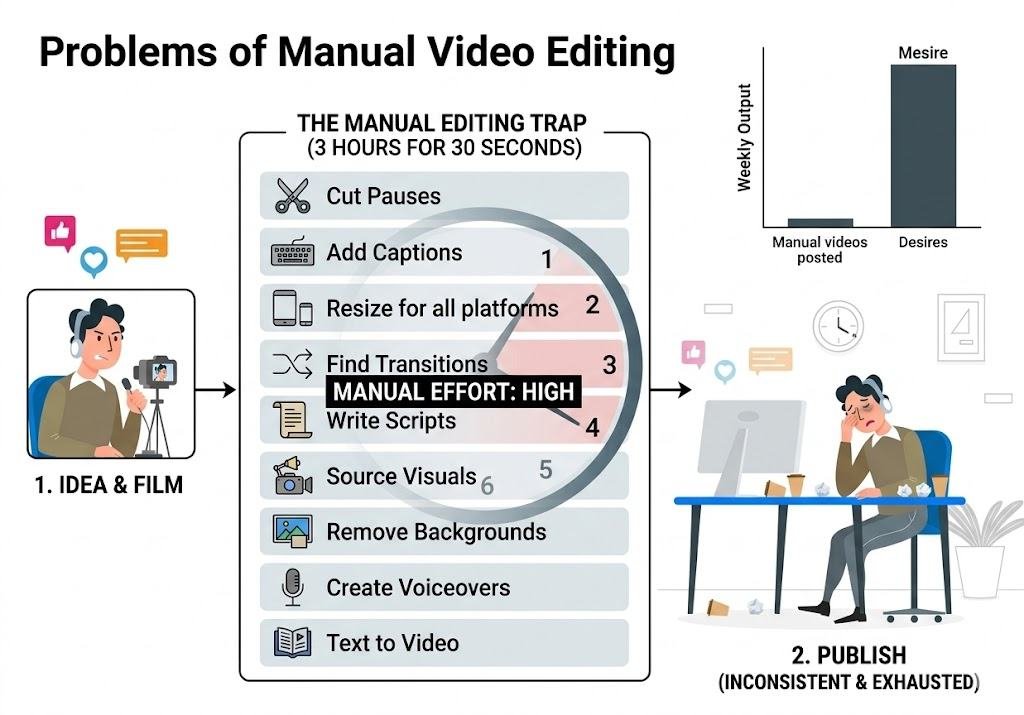
If you have ever spent three hours editing a 30-second Reel, you already understand the problem.
Social media rewards consistency, but consistency becomes exhausting when every video requires manual editing.
AI tools help by automating repetitive work, such as:
- Cutting pauses and silences
- Adding captions automatically
- Resizing videos for TikTok, Instagram, YouTube, and LinkedIn
- Generating transitions
- Creating scripts
- Suggesting visuals
- Removing backgrounds
- Creating voiceovers
- Turning text into video
For creators and businesses in the UK, this matters even more now because social platforms increasingly prioritise video content over static posts.
We are all expected to publish more content than ever before, often with smaller teams and tighter budgets.
AI editing tools help make that sustainable.
1. Topview: Best for Creating Full Videos Quickly
If you have ever wished you could describe a video idea and let AI build it for you, Topview is probably the closest thing available right now.
Topview goes beyond editing. It actually creates complete social media videos using AI.
Powered by Seedance 2.0, it can generate videos from:
- A text prompt
- A product link
- A reference video
- Marketing copy
- Ecommerce pages
This is especially helpful if you run:
- An online store
- Paid social ads
- A marketing agency
- A content-heavy business
What Makes It Useful
One of the most relatable problems in marketing is creative fatigue.
You make one good ad, it performs well, then suddenly performance drops, and you need five more variations immediately.
Topview helps solve that by generating multiple video styles quickly.
You can also recreate viral-style content using its Reference Video feature, which helps if you constantly save TikToks, thinking:
“I wish we could make something like this for our brand.”
Features We Actually Found Helpful
- An AI Video Agent that creates finished videos
- URL-to-video generation for products
- AI avatars with lip-sync using GPT Image 2
- Multi-platform resizing
- Fast ad creative generation
- Automatic social formatting
Best For
- Ecommerce businesses
- Agencies
- Paid advertising teams
- People are creating high volumes of content
Pricing
Starts from around $0.50 per video.
2. CapCut: Best Free AI Video Editor
If you already spend time on TikTok or Instagram Reels, there is a good chance you have used CapCut without even realising it.
CapCut has become one of the most popular editing apps because it balances simplicity with genuinely powerful AI tools.
And honestly, for many creators, the free version is enough.
Why So Many People Use It
CapCut feels less intimidating than professional editing software.
You can open the app, drag clips in, add captions, use trending transitions, and export a polished short-form video without needing editing experience.
For small businesses and solo creators in the UK, that simplicity matters.
Features That Save Time
- Auto captions
- Smart cuts
- Background removal
- AI effects
- Trending transitions
- Mobile-friendly editing
- Direct TikTok publishing
Best For
- Beginners
- Small businesses
- Content creators
- Fast social edits
Pricing
- Free plan available
- Pro version around £7 to £10 monthly
3. Descript: Best for Turning Long Videos Into Social Clips
If you create podcasts, webinars, interviews, or YouTube videos, Descript can save you an unbelievable amount of time.
Instead of editing video traditionally, you edit the transcript.
Delete a sentence from the text, and the video updates automatically.
The first time most people use it, it feels strangely satisfying.
Why It Is So Helpful
Many of us record long-form content but struggle to repurpose it into shorter social clips consistently.
Descript makes that process much easier.
You can:
- Remove filler words automatically
- Cut silences
- Generate social clips
- Create captions
- Edit screen recordings
- Collaborate with teams
Best For
- Podcasters
- Coaches
- Educators
- YouTubers
- B2B marketers
Pricing
- Free tier available
- Paid plans start around $24 monthly
4. Runway: Best for Creative and Cinematic Content
Runway is the tool many creators use when they want their videos to look visually different from everything else online.
This is less about speed and more about creativity.
If you have ever seen AI-generated cinematic visuals online and wondered how people make them, there is a good chance Runway was involved.
What Makes It Different
Runway focuses heavily on:
- AI visual generation
- Motion effects
- Background replacement
- Cinematic editing
- Style consistency
For creative agencies and visual brands, this can make content feel far more premium.
Best For
- Creative teams
- Fashion brands
- Designers
- High-end campaigns
Pricing
- Free plan available
- Paid plans start around $15 monthly
5. InVideo: Best for Quick Marketing Videos
Sometimes you do not want cinematic editing.
You want to create a clean, professional social video quickly without overthinking everything.
That is where InVideo works well.
Why People Like It
InVideo uses templates heavily, which makes it practical for:
- Local businesses
- Coaches
- Restaurants
- Real estate agents
- Service providers
Instead of building everything from scratch, you customise pre-made layouts.
Helpful Features
- AI script generation
- Text-to-video conversion
- Thousands of templates
- Easy resizing
- Voiceovers
- Stock footage access
Best For
- Small businesses
- Solo marketers
- Fast promotional videos
Pricing
Plans start around $15 monthly.
6. Canva: Best If You Already Use Canva
A lot of businesses already use Canva for graphics, presentations, or social posts.
Its video tools now make it easy to keep everything in one place.
Why Teams Like It
Canva keeps branding simple.
Your fonts, colours, logos, and templates stay consistent across all content, which helps teams work faster without constantly fixing design issues.
Features We Found Useful
- Drag-and-drop editing
- Brand kits
- Team approvals
- AI Magic Design
- Social scheduling
- Easy collaboration
Best For
- Teams
- Startups
- Agencies
- Businesses already using Canva
Pricing
- Free version available
- Canva Pro around £10 to £15 monthly
How We Recommend Choosing the Right Tool
The best AI editor depends less on “which tool is best” and more on how you actually create content.
| If You Need | Best Option |
|---|---|
| Full AI-generated videos | Topview |
| Free editing tool | CapCut |
| Podcast clipping and repurposing | Descript |
| Cinematic creative visuals | Runway |
| Fast marketing templates | InVideo |
| Team collaboration and branding | Canva |
What Actually Works for Most People
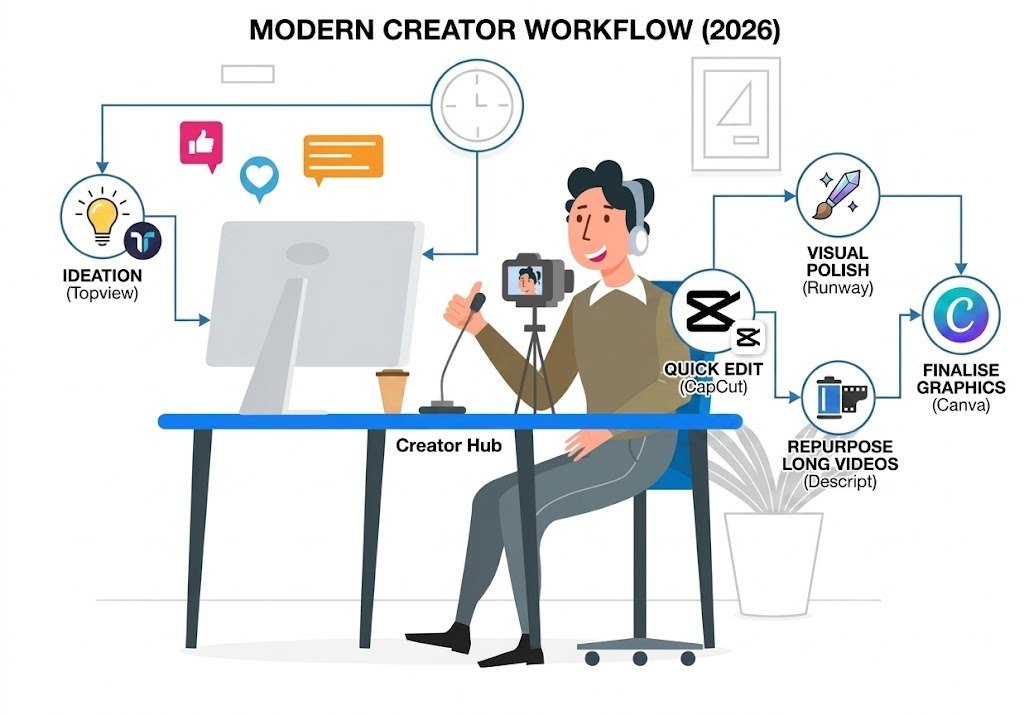
One thing we have noticed is that most creators do not rely on only one platform anymore.
Instead, they combine tools.
For example:
- Generate ideas or ad creatives with Topview
- Edit quickly in CapCut
- Repurpose long videos in Descript
- Add visual polish in Runway
- Finalise branded graphics in Canva
That workflow is becoming very common in 2026 because every platform does something particularly well.
Things UK Businesses Should Think About
If you are using AI video tools professionally in the UK, a few practical things matter beyond editing quality.
GDPR and Privacy
If you handle client footage or customer information, make sure platforms follow proper privacy and data handling standards.
Caption Quality
A large percentage of social users watch videos without sound.
Accurate captions are not optional anymore, especially on LinkedIn and Instagram.
Platform Resizing
The best AI editors automatically optimise videos for:
- TikTok
- Instagram Reels
- YouTube Shorts
That alone saves hours every week.
Closing Thoughts
AI video editing is not about replacing creativity.
It is about removing the repetitive work that drains creative energy.
Most of us do not need more complicated software. We need tools that help us create consistently without turning content production into a full-time editing job.
The creators and businesses growing fastest on social media right now are not necessarily the ones with massive production budgets.
They are the ones who:
- Post consistently
- Adapt quickly
- Test ideas often
- Understand their audience
- Use tools intelligently
AI video editors help make that possible.
The smartest approach in 2026 is not choosing between human creativity and AI.
It is learning how to combine both in a way that saves time, reduces burnout, and helps you focus on the part people actually connect with: your ideas, your message, and your personality.