



Every product team has experienced the “Frankenstein” launch. You have a vision for a cohesive, minimalist visual brand, perhaps with soft lighting and a specific desaturated color palette. But as the launch date nears and the demand for assets explodes, the cracks begin to show. The hero image on the landing page looks premium and cinematic, but the Instagram story ad feels oddly saturated and “plastic.” The 16:9 YouTube banner captures the product’s texture, but the 9:16 mobile version hallucinates extra shadows that weren’t in the original brief.
This is the prompt drift problem. It is the technical friction that occurs when generative models are asked to scale across different aspect ratios, resolutions, and platforms without a unifying “visual logic.” For teams using AI to generate high-volume creative batches, the challenge isn’t just generating an image; it is ensuring that the 500th image belongs to the same family as the first.
Invisible Tax of Visual Inconsistency in Product Launches
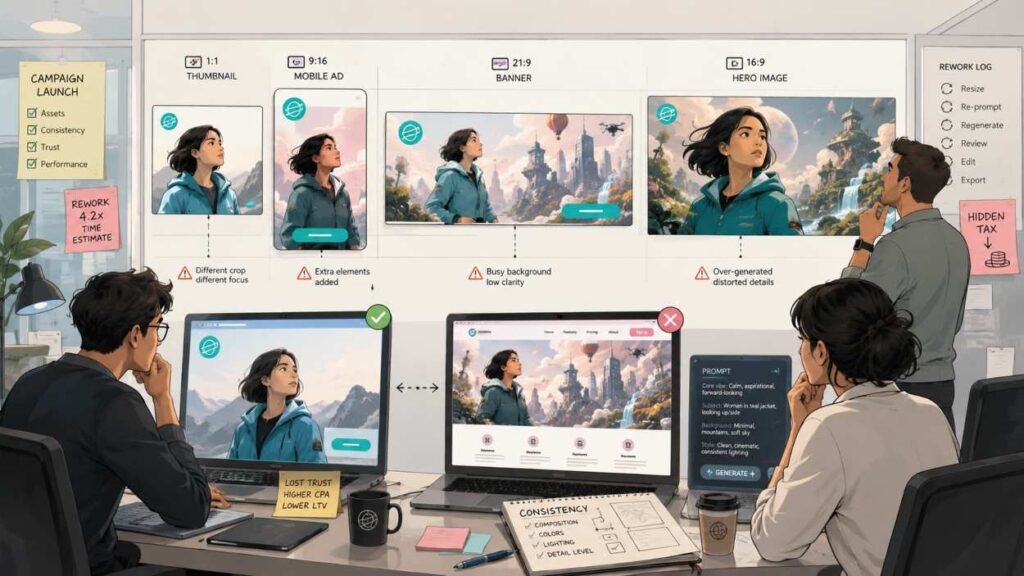
In a high-stakes launch, consistency is a proxy for trust. When a user clicks a sleek, professional-looking ad and lands on a page with visuals that feel slightly “off,” there is a moment of cognitive dissonance. It suggests a lack of attention to detail. In the world of AI generation, this inconsistency usually stems from how models interpret prompts at different scales.
Standard prompts are notoriously sensitive to aspect ratio changes. A prompt that produces a centered, balanced subject in a 1:1 square often fails when shifted to a 21:9 ultra-wide banner. The model feels the need to fill that extra horizontal space, often adding elements extraneous clouds, busy backgrounds, or distorted limbs that weren’t part of the original aesthetic.
Furthermore, there is the issue of resolution-dependent detail. When moving from a low-res thumbnail to a 4K hero image, many models “over-generate” details, introducing textures that weren’t present in the draft. This is the invisible tax of AI production: the more you scale, the harder it is to keep the “vibe” intact. Teams often find themselves trapped in an endless loop of manual prompt tweaking, which defeats the purpose of using AI for speed.
Identifying the Fail Points in Volume Production
The breakdown usually happens at three specific points:
- The Aspect Ratio Shift: Changing from 1:1 to 9:16 forces the AI to re-evaluate the “weight” of the prompt, often leading to composition errors.
- The Seed Divergence: Even with the same prompt, different model tiers can interpret “soft lighting” in wildly different ways.
- The Resolution Gap: High-fidelity models can add a layer of complexity that actually harms a brand’s minimalist identity.
Tiered Production: Using Nano Banana for Aesthetic Prototyping
To solve this, a tiered strategy is required. Instead of jumping straight into high-resolution generation, content teams should use a diagnostic phase. This is where Nano Banana AI serves as a vital prototyping tool. Rather than seeing a lighter model as a compromise, think of it as a low-stakes laboratory for “visual seed” testing.
Because Nano Banana is optimized for speed and lower credit consumption, it allows a creator to burn through 50 or 100 variations of a concept in minutes. During this phase, you aren’t looking for the final asset; you are looking for the combination of lighting, color, and composition that holds up across different prompts.
Low-Credit Diagnostic Workflow
The goal here is to lock in the “compositional DNA.” On the Kimg AI platform, you can use the sign-up bonus credits to run high-volume tests. If you are launching a new consumer tech product, you might use Nano Banana to test how a “brushed metal texture” reacts to “dawn lighting” across five different aspect ratios simultaneously.
By the time you have spent 100 credits, you should have a “Winner” prompt, a string of text and a specific style setting that produces consistent results. This is your aesthetic north star. Attempting to do this with a high-fidelity, high-credit model from the start is an expensive way to realize that your prompt doesn’t work in portrait mode.
A Moment of Uncertainty: The Draft-to-Final Disconnect
It is important to manage expectations here. A common limitation of this tiered approach is that a composition that looks perfect in a Nano Banana draft might lose some of its “soul” when upscaled. Higher-tier models have a tendency to “correct” what they perceive as imperfections in the draft, sometimes removing the very character that made the low-res version work. Prototyping is about finding the direction, but the transition to final render still requires a steady hand.
Bridging the Gap: Scaling Style Logic with Banana AI
Once the visual logic is locked in with the prototype, it is time to move to the production-grade model. Using Banana AI for the final assets allows teams to leverage superior texture rendering and “K-level” resolution while maintaining the structure established in the draft.

The most effective way to bridge this gap is through Image-to-Image (I2I) workflows. Rather than just copying the text prompt from the prototype, you use the prototype image itself as a reference for the Banana AI model. This anchors the AI’s “creativity,” forcing it to respect the lighting and color balance of the draft while applying a higher level of polish.
Maintaining Texture Across 16:9 and 9:16
The technical reality of high-fidelity models is that they often struggle with the simplicity of low-fi concepts. If your brand relies on a flat, matte aesthetic, a powerful model might try to add “cinematic” lens flares or realistic skin pores that you don’t want.
When scaling for a multi-channel campaign, say, a 16:9 desktop banner and a 9:16 TikTok background, you must ensure the texture of the product stays the same. By using the same “style anchor” image for both, you tell the model: “The lighting comes from the left, and the surface is non-reflective.” This prevents the model from making independent (and often wrong) decisions for each format.
Style Anchor Workflow: Practical Execution for Content Teams
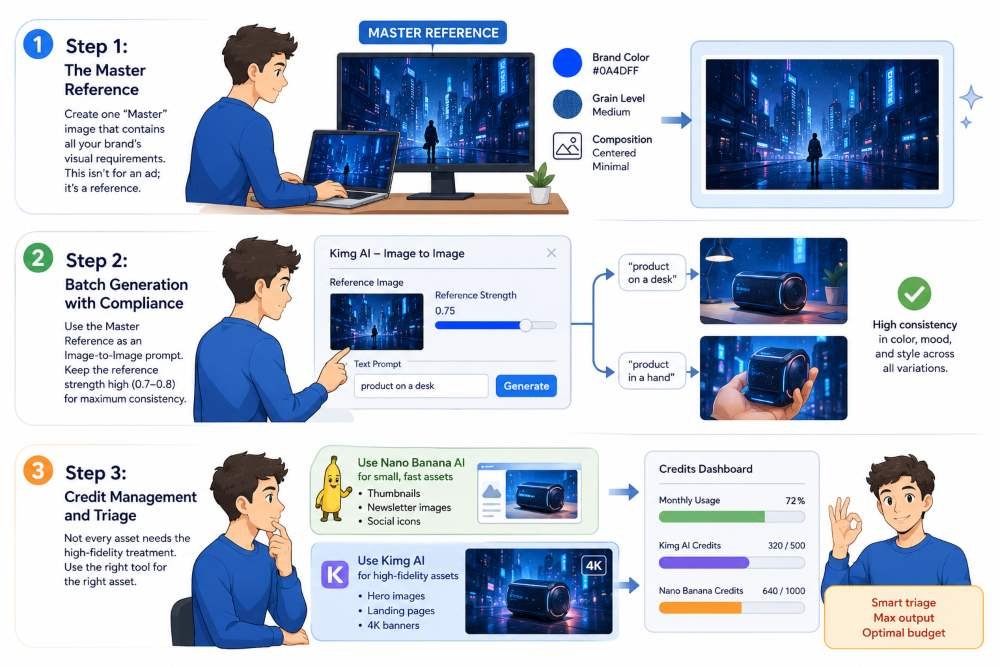
A repeatable workflow is the only way to scale without losing control. For product teams using Kimg AI, the workflow should look something like this:
Step 1: The Master Reference
Create one “Master” image that contains all your brand’s visual requirements. This isn’t for an ad; it’s a reference. If your brand is “cyberpunk-minimalist,” this image should perfectly capture that specific blue hue and that specific level of grain.
Step 2: Batch Generation with Compliance
When generating the actual ads, use the Master Reference as an Image-to-Image prompt. In the Kimg AI interface, you can adjust the “strength” of the reference. For high consistency, keep the reference strength high (around 0.7 or 0.8). This ensures the AI doesn’t deviate from the brand color palette, even if the text prompt is slightly different for each ad (e.g., “product on a desk” vs. “product in a hand”).
Step 3: Credit Management and Triage
Not every asset needs the high-fidelity treatment. A small thumbnail for a newsletter can be handled by Nano Banana AI, saving your premium credits for the 4K hero assets that will live on the landing page. This triage approach allows teams to produce hundreds of assets per month without blowing the budget.
Limits of Automation: Where Human Oversight Is Non-Negotiable
Despite the advancements in models like Nano Banana and its pro counterparts, there are hard limits to what AI can do in a batch workflow.
Typography Trap
AI models are still notoriously unreliable when it comes to complex typographic integration. While they can render short words, asking a model to produce a high-res background with perfectly kerned, brand-compliant text is a recipe for disaster. Teams should generate “clean” backgrounds and use traditional design tools (like Figma or Photoshop) for the text layers. Trying to automate the “final-final” asset with text included usually leads to “uncanny valley” fonts that feel unprofessional.
Human “Vibe Check”
AI tools are engines of speed, not autonomous creative directors. A batch of 500 images will inevitably contain “hallucination artifacts” a third leg on a lifestyle model, or a product shadow that defies the laws of physics. High-volume production requires a human editor to perform a “vibe check” on every export. The goal of using Banana AI and other tools is to get you 95% of the way there in seconds, but that last 5% remains the domain of human judgment.
In the end, scaling visual assets is about discipline. By using a tiered approach prototyping with Nano Banana and finalizing with Banana AI teams can solve the prompt drift problem and ensure their product launches look as cohesive as they feel. AI shouldn’t be used to replace the brand’s soul; it should be used to broadcast it across every channel at a speed that was previously impossible.