

Between October and March, British creators lose the argument with the sun. You can plan a shoot for a Tuesday afternoon in Manchester and get forty minutes of usable light if you are lucky. Reshoot on demand is a fantasy for most of the year, which is why the single most valuable thing in a small creator’s library is not a camera. It is the handful of photographs that came out well.
Case For Doing Less Photography

Ofcom’s 2026 research into UK media habits found that active posting on social platforms has fallen sharply, with just under half of adult users now posting, sharing or commenting, down from around three in five two years earlier. More people watching, fewer people making.
That cuts two ways for anyone publishing. There is less noise to fight through, but the audience is also more selective about what earns a stop. A steady stream of visually incoherent posts is worse than a smaller run of images that plainly belong to the same person or business.
Which means the goal is not volume. It is a small, deliberate set of images that each do a distinct job and still look like they came from the same shelf.
Not Every Photograph Is Worth The Trouble
Repurposing rewards good source material and punishes bad. Before you plan five variants, be honest about whether the original can carry them.
For portraits, you want a clearly lit face, an unforced expression, and enough separation between the subject and whatever is behind them. For products, the shape, colour, texture and any packaging detail need to read accurately, because every later version inherits those. For lifestyle shots, there has to be one obvious subject rather than a busy scene where the eye has nowhere to land.
None of this requires a perfect photograph. It requires a legible one. A slightly awkward pose can become five useful images. A soft, badly framed one will produce five slightly different soft, badly framed images, and you will have spent an afternoon finding that out.
One strong frame beats four adequate ones. Pick the strong frame.
Decide The Job Before You Open Anything
The most common failure here is editing without a brief. Swap the background five times, and you have five pictures. You do not necessarily have five assets, because nothing tells you where any of them goes.
Write the list first. For a portrait, a sensible set looks like this: a clean master, a professional headshot, a contextual social image, a seasonal campaign version, and one stylised interpretation: five roles, five reasons to exist, five different ways of judging whether the edit worked.
A product photograph follows the same logic with different labels: catalogue, lifestyle, social, seasonal, creative.
The list is what stops you from fiddling. If a change does not serve a named job, it is not an improvement; it is just a change.
Build The Master Before Anything Else
Almost every good repurposing workflow starts with a boring edit.
Before you touch backgrounds or styling, fix the things that would otherwise be wrong in all five versions. The exit sign over your shoulder. The delivery box at the edge of the frame. The stray cable across the worktop. A text-driven AI image editor such as Aggiii AI handles this kind of targeted removal from a written instruction, so you are not manually cloning pixels for half an hour.
Then save that file and treat it as the original. Everything else branches from it.
This matters more than it sounds. If you edit the edit, then edit that, you accumulate artefacts and drift. Faces subtly shift. Colours wander. By the fourth generation, the person in the picture is a cousin of the person you photographed. Branching from a single clean master keeps every variant one step away from reality rather than four.
Five Jobs, And What Each One Actually Needs
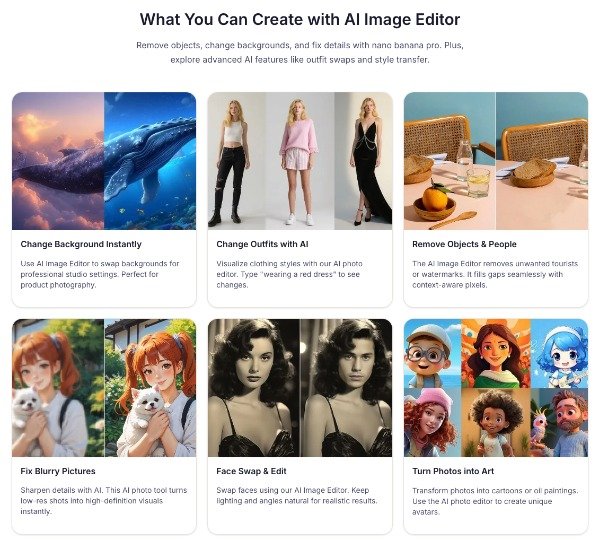
- The professional version is the most restrained edit you will make. Usually it needs nothing but a calmer background. Something like: keep the face, hair, expression, clothing and pose exactly as they are; replace the background with a bright neutral studio setting and soft directional light. The aim is to remove competition for attention, not to produce a different person. This becomes your byline photo, your LinkedIn picture, your speaker bio, your Companies House-adjacent respectability shot.
- The social version can carry more context, and usually should. A post about workflow sits better against a tidy desk than against a blank sweep. A post about seasonal styling needs clothing that matches the claim. The rule is that the setting should reinforce the message rather than argue with it. A cluttered background undercuts a post about organisation no matter how nice the photograph is.
- The seasonal version is where editing saves the most money. Britain runs on a predictable promotional calendar: back-to-school in September, Bonfire Night, the long Christmas run, January reset, Valentine’s, Easter, the May bank holidays. Each wants a visual nod. You can test a winter direction from an August photograph by changing an outfit to a heavier knit and warming the environment, then decide whether it is worth a real shoot.
- The stylised version abandons realism on purpose. An illustrated treatment, a painterly render, something with visible texture. It works for covers, posters, carousel openers, anywhere a distinctive look is the point. Keep facial structure, pose and composition recognisable or you lose the thread back to the person.
- The master stays realistic and untouched by any of the above. It is the thing you return to.
The Part Most Guides Skip
If any of these images will appear in commercial content, UK rules apply, and they apply regardless of how the image was made.
The Committee of Advertising Practice has been clear that existing Code rules cover AI-generated and AI-edited content, with no separate AI regime and no blanket disclosure requirement. What does bite is the ordinary prohibition on misleading by exaggeration or omission. Editing a portrait for a cleaner background is uncontroversial. Editing a product so it looks like something the customer will not receive, or retouching a before-and-after so the result overstates what the product does, is the same problem it always was, now faster to create. CAP’s own framing is useful: ask whether the audience would be misled without disclosure, and whether disclosure would clarify the message or contradict it. Labelling does not rescue a fundamentally misleading image.
There is also the question of whose face you are editing. CAP has noted that Section 6 rules on featuring recognisable individuals are likely to apply to AI-generated likenesses, and the government’s 2026 copyright report flagged support for stronger protections around unauthorised digital replicas of a person’s image and voice. Editing your own portrait is your business. Editing a client’s, a colleague’s or a model’s needs their agreement, in writing, covering the specific uses.
On ownership, the position is less settled than most people assume. Your photograph is your copyright, straightforwardly. What the AI edits add is murkier. UK law currently has an unusual provision for computer-generated works under s.9(3) of the Copyright, Designs and Patents Act 1988, and the government’s Report on Copyright and Artificial Intelligence proposes removing it while preserving protection for AI-assisted works where a human made the creative choices. A&O Shearman’s analysis of how ownership of AI-generated content works in the UK sets out why the originality requirement makes this genuinely unresolved.
The practical upshot: an image that starts as your photograph and carries your creative decisions is on much firmer ground than one conjured from a prompt. Keeping and documenting the master is not just workflow hygiene. It is evidence.
If you work with EU-based brands, note that transparency obligations there run on a different track, and this overview of the 2026 regulatory picture for AI in advertising is worth ten minutes before you sign a cross-border contract.
Why Your Edited Photo Might Arrive With An AI Label
This one catches people out, and almost nobody warns you.
Most major AI editing tools embed provenance metadata using the Content Credentials standard. Platforms read it. TikTok was the first video platform to implement Content Credentials, and Meta and LinkedIn now run comparable systems. Increasingly, the platforms detect and label whether or not you disclose anything yourself.
The awkward part is that these systems do not distinguish well between “generated from nothing” and “background tidied up”. Creators using AI editing tools on genuine photographs have seen their work auto-labelled as AI content. If your audience reads that badge as “this is fake”, a five-second cleanup edit has cost you credibility you did not need to spend.
There is no clean fix, but there are sensible responses. Know which of your tools sign their output. Keep the master so you can show what the original looked like. If a label appears on something that is fundamentally your photograph, say so in the caption rather than letting the badge speak alone. And be aware that platform pipelines frequently strip this metadata during upload anyway, so the absence of a label proves nothing either.
Honesty is cheaper than the alternative. Most audiences do not mind that you removed a bin from the background. They mind being misled about what they are looking at.
Keeping The Set Recognisably Yours
Consistency is the thing that turns five images into a collection rather than a coincidence.
For portraits, name the fixed points in your instructions: facial features, hairstyle, expression, pose, glasses, a distinctive jacket. For products, name the packaging, logo placement, colour, material and proportions. These instructions set boundaries, but they are not guarantees. Check every output against the master, particularly around hands, text, logos and jewellery, which remain the weak spots.
Then look at the five together rather than one at a time. Does the same person appear in all of them? Does the colour temperature wander? Would someone scrolling past recognise the second image from having seen the first?
If the set feels like five different accounts, you have optimised each variant and lost the collection.
Where Repurposing Stops Working
It is not a substitute for photography, and pretending otherwise produces thin content.
New products need new photographs. A genuinely different angle, pose or gesture needs a camera. Anything where the point is that you were actually somewhere — the market stall, the workshop, the finished job on site — needs to have actually happened. Editing can extend a shoot. It cannot invent one.
There is also a slower cost. If every image on your account is a variant of the same three frames, people notice, even if they could not tell you why. Repurposing works best as the thing that fills the gaps between real shoots, not the thing that replaces them.
Two or three proper shoots a year, worked properly, will carry a small business further than monthly half-hearted ones.
One Last Practical Thing
If these images end up on your own website rather than only on social, name the files sensibly and write real alt text. Google’s guidance on how images get discovered and indexed is dull reading and consistently ignored, and it is the difference between a repurposed image doing one job and doing two.
Final Thoughts
The instinct when content feels hard is to make more of it. Usually the better move is to get more out of what already exists.
Pick a photograph that can take the weight. Clean it once and keep that file. Decide what each version is for before you edit it; branch every variant from the master rather than chaining edits together. Check the set for consistency, and check yourself against the ordinary rules about not misleading people.
Do that and one good afternoon with a camera stops being a single post. It becomes the visual foundation for a season.